



 GayBloom
4
GayBloom
4
This GayBloom review looks at a browser based dating site for gay, bi and lesbian adults, with free sign up, paid Full Member access and prices shown during sign up.
GayBloom suits you if you want a direct place to meet men seeking men or women seeking women. Sign up starts with an 18 or older check, then asks age, role, location, email and password. In this GayBloom review, I read the terms, walked through the public sign up screens and checked the App Store. Use the free start to see the flow, then read the paid terms before a trial renews.
This GayBloom review is for gay, bi, and lesbian singles who want a straightforward place to meet someone. On its homepage, GayBloom makes a simple promise: “No ghosting. No games. Just real.”
I reviewed the terms, walked through the public sign-up screens, and checked the App Store for the app and its rivals. I did not open an account.
Use the ratings below as a quick guide before you spend time or money. They show where GayBloom feels strongest and where you may want to slow down.
GayBloom stands out most for its easy sign-up. The public registration path asks for basic details, uses clear labels, and keeps the first step simple.
The feature set also rates well because GayBloom offers photo review, message filters, Profile Boost, and Introductory Greetings. Pricing is less straightforward because you see plan prices during sign-up, and trials can renew into a full monthly plan.
My verdict: GayBloom is worth a look if you want a browser-based LGBTQ+ dating option with a quick start and visible safety checks. Set your budget before you begin, read the renewal terms, and use the promotion tools with intention.
GayBloom is an adults-only dating site for men seeking men and women seeking women. It may suit you if you want a simple sign-up, a mobile browser option, and tools that can help more people see your profile.
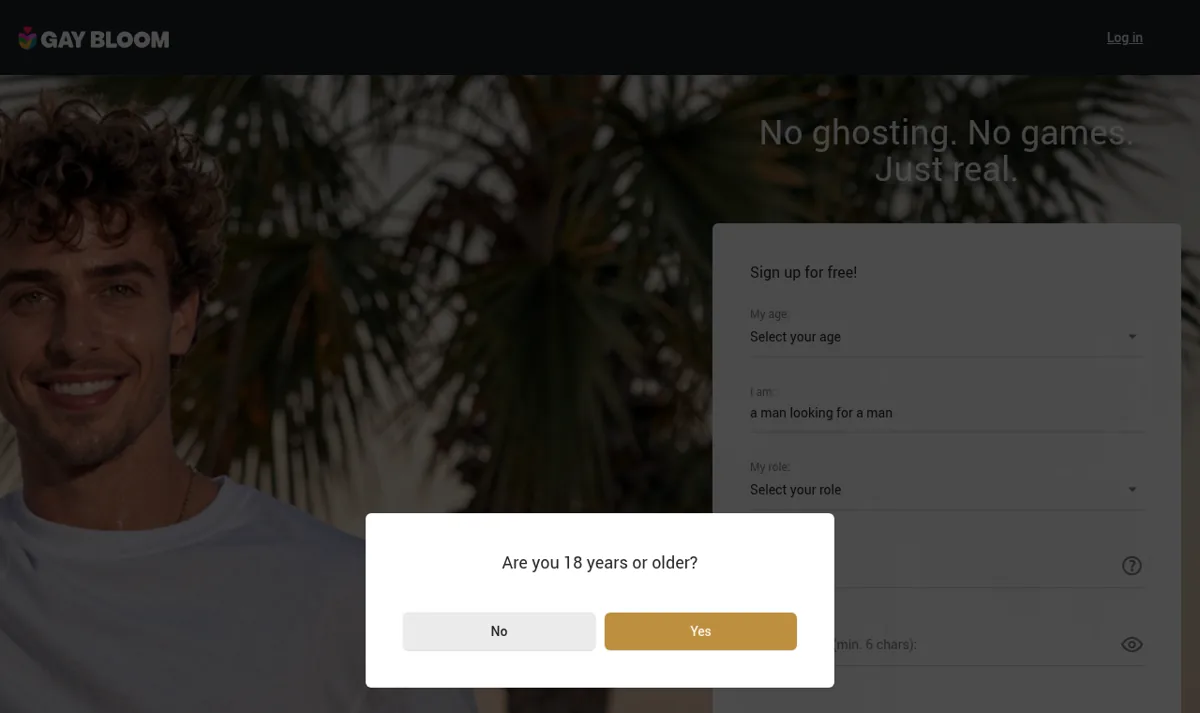
GayBloom’s sign-up path asks whether you are “a man looking for a man” or “a woman looking for a woman.” That makes the basic matching path clear from the beginning.
Membership options include Guest, Free Member, and Paid Member, also called a “Full Member.” Free members may not have access to every feature.
You may also see profiles marked with a “Partner” or “Promotional” badge. GayBloom says these badges distinguish those profiles from members, and they may not send automated activity notifications.
The first screen asks whether you are 18 or older. GayBloom’s terms also state that the service is for adults only.
After that, sign-up asks for your age, role, location by city or ZIP code, email, and password. Your password must contain at least 6 characters.
Where the law requires it, GayBloom may ask you to verify your age. Methods can include photo ID, an ID plus a live selfie match, AI facial age estimation, payment card confirmation, or open banking.
A useful review should answer the safety question plainly. If you are asking, “Is GayBloom legit?” the site has age rules, moderators review photos before they go live, and message filters screen for risk signals.
These are the practical details to check before you create a profile or pay.
This sign-up section covers what GayBloom shows before registration. I did not open an account, so these details come from the public screens.
GayBloom starts with a clear adult-only gate. First, you see an “Are you 18 years or older?” check.
That first screen matters because GayBloom is for adults 18 and older. Depending on legal requirements, the site may ask for age verification later.
Next, GayBloom asks who you want to meet. The public sign-up flow shows “a man looking for a man” and “a woman looking for a woman.”
Choose the option that matches how you want to date. This helps the site place you in the appropriate pool from the start.
After that, GayBloom asks for your role. Take a moment here, because role choices can shape who sees you and who feels right to contact.
Location comes next, with a city or ZIP code. The example shown is “E.g. Washington, D.C. or 20001.”
Enter the place where you actually want to meet people. If you want more local matches, a nearby city may work better than a very small suburb.
GayBloom then asks for your email and password. Your password must contain at least 6 characters.
Choose an email address you check regularly because dating sites often use email for account and billing notices. Also, use a password that you do not use for other accounts.
Free sign-up gets you started, but GayBloom offers Guest, Free Member, and Paid Member levels. Free members may not have access to every feature.
Subscriptions can include trials, such as 3-day or 1-week options, as well as 1, 3, or 6-month plans. You see prices during sign-up, and a trial changes to a full monthly plan unless you cancel before it ends.
Plans renew automatically, so set a calendar reminder if you start a trial. To stop renewal, turn off auto-renewal in your account settings and cancel at least 24 hours before renewal.
There is no US App Store app under the GayBloom name. The site works in a mobile browser, so save your login securely if you plan to use your phone.
Moderators review photos before they go live. Automated and manual filters also screen messages for external links, payment requests, and abusive language.
A fair look at legitimacy starts with these visible controls, along with the adult-only sign-up and marked partner profiles. GayBloom’s terms say partner profiles carry a “Partner” or “Promotional” badge and may not send automated activity notifications.
For a wider look at queer dating options, you can also read our Asian dating guide with an LGBTQ+ section. Use it as a companion if culture, identity, and location all matter in your search.
You start with free registration, and GayBloom then separates access by membership type. The site works in a mobile browser because there is no app under this name in the US App Store.
Paid access comes through trials, such as 3-day or 1-week options, plus 1, 3, or 6-month plans. You see prices during sign-up, and plans renew automatically unless you turn off auto-renewal in your account settings.
Your profile is the first filter other people use. Add current photos that show your face, your style, and the kind of date you would enjoy.

GayBloom says moderators review photos before they go live. This gives the site an additional check before images appear.
Be direct about what you want, whether that means dating, flirting, or a relationship. A clear profile usually makes it easier for compatible people to respond.
Profile Boost is one of GayBloom’s promotion tools. It can help you reach more members, and you choose who receives it.
Use it once your profile is ready, with reviewed photos and a clear bio. A boost has more impact when people can quickly understand who you are.
Try it when you know you can reply promptly. Quick responses can reduce missed opportunities and help keep the conversation going.
Introductory Greetings give you another way to reach more members. GayBloom lets you choose who receives them.
Use greetings as openers, then follow up with a message that refers to the person’s profile. Showing specific interest usually feels warmer than sending a generic hello.
GayBloom uses automated and manual message filters. They screen for external links, payment requests, and abusive language.
You can limit or switch off activity notifications in your settings. This helps if you want fewer alerts while keeping your profile active.
Remember that GayBloom’s terms say the site does not run criminal or background checks. Keep normal dating safety habits, especially before meeting someone in person.
GayBloom offers two promotion tools: “Profile Boost” and “Introductory Greetings.” Both can help you reach more members.
The useful part is the control you have. You choose who receives these promotion tools.
Use Profile Boost once your profile feels ready. Add clear photos first because moderators review them before they go live.
Introductory Greetings can help you make first contact without overthinking every word. Still, choose recipients carefully because focused targeting usually works better than sending attention everywhere.
Before using either tool, consider your search habits. Focus on people you would actually message, meet, and treat respectfully.
Short, warm openers usually work better than a long speech. When a profile gives you something to respond to, mention that specific detail.
You can also limit or switch off activity notifications in your settings. That can help if alerts make you check the site too often.
Try keeping useful alerts on during your first few days. Then reduce anything that makes dating feel noisy or rushed.
GayBloom also screens messages for external links, payment requests, and abusive language. Keep early chats on the site while you decide whether someone feels genuine and consistent.
This review treats the promotion tools as helpful boosts, not substitutes for effort. Your results still depend on a clear profile, honest intentions, and replies that sound like you.
The free sign-up path leads with the promise, “No ghosting. No games. Just real.” You first confirm that you are 18 or older because the service is for adults only.
For this GayBloom review, I read the terms and walked through the public sign-up screens without opening an account. Sign-up asks for your age, whether you are a man looking for a man or a woman looking for a woman, your role, location by city or ZIP, email, and a password of at least 6 characters.
Member types include Guest, Free Member, and Paid Member, also called Full Member. Free members may not have access to every feature, so use the free stage to understand the site before deciding whether to pay.
GayBloom shows current prices during sign-up, including trial and longer plans. This matters because trials renew automatically unless you cancel before they end.
Free Plan: Free sign up is available, and Guest, Free Member and Paid Member types exist. Free members may not access every feature, so message access and other tools can depend on upgrading.
| Plan | Price | Duration | Renewal |
|---|---|---|---|
| 3 day trial | Shown during sign up | 3 days | Turns into monthly plan |
| 1 week trial | Shown during sign up | 1 week | Turns into monthly plan |
| 1 month plan | Shown during sign up | 1 month | Renews automatically |
| 3 month plan Most Popular | Shown during sign up | 3 months | Renews automatically |
| 6 month plan | Shown during sign up | 6 months | Renews automatically |
GayBloom has trial periods, for example 3-day or 1-week trials, plus 1, 3, and 6 month plans. A trial turns into a full monthly plan unless you cancel before the trial ends.

Plans renew automatically, so treat any trial like a paid plan from day one. Add the end date to your calendar as soon as you start.
Paid access comes at the Full Member level, and prices appear during sign-up. Before paying, check the plan length, renewal date, and features included.
The terms generally make payments non-refundable. Use the cancellation option in your account settings because a chargeback can close the account.
You can turn off auto-renewal in your account settings. GayBloom says you must cancel at least 24 hours before renewal, so do it earlier if you might forget.
Save any cancellation confirmation you receive. It is also a good idea to take a screenshot after you turn off auto-renewal.
For help, GayBloom lists support at support@gaybloom.com and phone support at 1 (800) 940-9830. Contact those channels before a renewal date if anything looks unclear.
I checked the US App Store and found no app under this name. Plan to use GayBloom in a mobile browser, which can still work well for quick replies.
A dating site works best when you use it with intention. This GayBloom review focuses on helping you start clearly, stay safe, and move promising conversations toward real dates.
Start with a profile that makes it easy for someone to reply. Mention what you like, what you are looking for, and one simple detail someone can ask about.

Choose photos you would feel comfortable showing on a first date. Moderators review photos before they go live.
Use your location honestly because sign-up asks for a city or ZIP. Accurate location details can help you avoid long chats with people you cannot realistically meet.
For Profile Boost or Introductory Greetings, choose your recipients carefully. A small, focused group usually works better than sending attention everywhere.
Limit or switch off activity notifications in your settings if needed. Adjust them if constant pings make you rush replies or check the site too often.
When you can, open with something specific from the other person’s profile. A warm question works better than a generic compliment because it gives them an easy way to respond.
Keep your first messages respectful and on the site. GayBloom uses automated and manual filters to screen for external links, payment requests, and abusive language.
If someone asks for money, pressures you, or moves too quickly, slow things down. You do not owe a stranger instant trust.
Some model profiles may appear with a “Partner” or “Promotional” badge. These profiles may not send automated activity notifications, and the badges help distinguish them from members.
If you came here asking, “Is GayBloom legit?” focus on the visible signals you can check. Read profile badges, use the built-in tools, and keep normal dating safety habits in place.
Once a conversation feels mutual, suggest a simple first meeting. Coffee, a walk in a busy area, or a short drink can keep the pressure low.
GayBloom’s terms say the site does not run criminal or background checks. Use normal dating safety practices, especially before sharing private details or meeting in person.
Tell a friend where you are going and meet somewhere public first. Keep your own way home, even if the person seems kind.
Look for consistency between the person’s profile, messages, and plans. Healthy interest feels steady, respectful, and curious about you too.
Treat GayBloom as a tool, then bring your real-world judgment with you. That balance can help turn a good conversation into a better date.
Your first week should be calm, focused, and practical. Treat GayBloom as a place to meet people rather than a slot machine for instant chemistry.
Start by completing the basics carefully. Your location, role, and dating direction affect who is likely to find you.
Add photos you feel good about and give moderators time to review them. Choose images that show your face clearly and match the kind of attention you want.
Write a simple profile that tells people who you are and what you want. Plain details often work better than clever lines when your goal is to meet someone real.
Check your settings before you start browsing. Limit or switch off alerts that could make dating feel pressured.
Look for profile badges as you browse. The site says partner profiles carry “Partner” or “Promotional” labels, so you can distinguish them from members.
Take your time before paying so you know what you want from the site. Free members may not have access to every feature, so use the free stage to learn the layout.
Now start giving thoughtful attention. Use Introductory Greetings only for people who genuinely interest you.
Keep messages short, friendly, and specific. A good opener can be as simple as noticing a shared interest or asking about a detail in the person’s profile.
Use Profile Boost after your photos and profile feel ready. That way, extra visibility leads people to a profile that can carry the conversation.
Pay attention to how people respond. Warmth, consistency, and respect tell you more than a polished opening line.
Stay alert for requests that do not belong in early dating. GayBloom screens for external links and payment requests, but you should still trust your own judgment.
Keep early chats on GayBloom until you feel ready to move elsewhere. Moving too quickly can make it harder to spot pressure or mismatched intentions.
Review your notification settings after a few days. Dating works better when alerts support your life instead of taking it over.
By the end of the week, you should have a better sense of whether GayBloom fits your dating style. Look at message quality, local activity, and whether the tools feel useful.
After starting a trial, check the renewal date right away. A trial changes to a full monthly plan unless you cancel before it ends.
According to GayBloom, plans renew automatically. Turn off auto-renewal in your account settings and cancel at least 24 hours before renewal if you do not want the next charge.
Payments are generally non-refundable, and a chargeback can close the account. Read the payment screen carefully before choosing a trial or longer plan.
When the people and pace feel right, consider whether a Paid Member plan fits your needs. The paid level may open features that Free Members cannot access.
For support, GayBloom lists support@gaybloom.com and phone 1 (800) 940-9830. Keep those details handy if you need help with billing, access, or settings.
Most of all, keep your standards kind and firm. Use GayBloom in a steady, honest way that reflects how you want to be treated.
If you came here asking about safety and legitimacy, the short answer is yes, based on the adult-only rules, photo review, message filters, and paid-plan information visible on the site. For this GayBloom review, I read the terms, walked through the public sign-up screens, and checked the App Store for the app and its rivals.
GayBloom is for adults 18 and older. Sign-up starts with an age check, then asks for your age, match preference, role, location, email, and password.
GayBloom reviews photos before they go live. Message filters also screen for external links, payment requests, and abusive language.

Where the law requires it, GayBloom may ask for age verification. Methods can include photo ID, an ID plus live selfie matching, AI facial age estimation, payment card confirmation, or open banking.
Model profiles from partner services may appear on the site. “Partner” or “Promotional” badges help you distinguish them from members.
You can limit or switch off notifications in your settings. This helps if you want a calmer inbox while deciding who deserves your time.
The terms say GayBloom does not run criminal or background checks. Treat it like any dating space and keep your own safety habits in place.
Never send money to someone you meet on GayBloom. Keep money matters off the site, even if the story sounds urgent or romantic.
A video call before meeting can help. A short conversation can confirm basic comfort, tone, and attraction before you spend time together in person.
Meet in public for a first date. Tell a friend where you are going and keep your own way home available.
Trust slow interest more than fast pressure. Real chemistry can handle a pause, a question, and a safety boundary.
GayBloom is for adults 18 and older. Where the law requires it, the site may use several age-verification methods.
The listed methods include photo ID, an ID plus a live selfie match, AI facial age estimation, payment card confirmation, or open banking. The method you see can depend on legal requirements.
Age checks help keep the site adult-only. That matters on any dating service, especially one where people may flirt, meet, or discuss private topics.
Have a current photo ID ready if your location requires it. Good lighting can also help if you need to complete a live selfie match.
Make sure your payment card details are current if that method appears. For open banking, use only the official prompts shown during the site’s own verification process.
Do not send identity documents in a chat message. Complete verification through the site’s stated process, not through another member.
Remember that GayBloom says it does not run criminal or background checks. Keep using normal dating safety practices even after someone passes an age check.
For first meetings, choose a public place and tell a trusted person your plan. Stay on the site until you feel comfortable moving the conversation elsewhere.
GayBloom has a clear sign-up path for “a woman looking for a woman.” This GayBloom review found free sign-up screens that ask for age, role, location, email, and a password.
Moderators review photos before they appear live. Message filters screen for external links, payment requests, and abusive language, which helps keep first contact more focused.
Free members may not get every feature, and paid plans include trials such as 3-day or 1-week options, plus 1, 3, or 6-month plans. Trials renew into a monthly plan unless you cancel before the trial ends, so set a reminder at least 24 hours before renewal.
GayBloom lists support by email at support@gaybloom.com. You can also call 1 (800) 940-9830.
I found no US App Store app under the GayBloom name. Use the site in a mobile browser if you want to check messages from your phone.
GayBloom fits singles who want a browser-based dating site with free sign-up, paid upgrades, and extra-reach tools. Grindr and HER bring large app audiences, while eharmony focuses on compatibility matching for relationships.
| Platform | Best For | How You Pay | Standout Feature |
|---|---|---|---|
| GayBloom | Gay, bi and lesbian singles who want a dating site | Free sign-up, then trial or 1, 3 or 6 month plan | Profile Boost and Introductory Greetings |
| Grindr | App-based dating with a large gay and bi audience | Unlimited from USD $27.99 | 4.45 from 387,896 App Store ratings |
| HER | Lesbian, bi and queer women who prefer an app | HER Gold USD $14.99 | 4.42 from 64,910 App Store ratings |
| eharmony | Singles looking for relationship matching | Plan price not listed here | Compatibility matching for relationships |
Choose GayBloom if you like a site that lets you sign up for free and then decide whether a trial or longer plan suits you. Prices appear during sign-up, and trials renew into a full monthly plan unless you cancel before the trial ends.
For more options before choosing, compare our wider guide to the best dating sites. This GayBloom review presents GayBloom as a practical, LGBTQ-focused dating site experience.
Use GayBloom if you are a gay, bi, or lesbian single who wants to meet someone through a dating site. It may suit you if you prefer a browser experience and clear sign-up steps.
GayBloom may also appeal to you if you want tools that help more people notice you. Profile Boost and Introductory Greetings can put you in front of selected members while you remain in control of who receives them.
You may prefer something else if you want a named US App Store app, a large app-first audience, or compatibility matching. GayBloom may still fit if you want a focused site with free sign-up and paid plans shown before purchase.
Yes, the site has public terms, free sign up and stated support contacts. If you searched is GayBloom legit, note that photos are reviewed before they go live and messages may be filtered for links, payment requests and abusive language.
GayBloom is for adults 18 or older. Sign up starts with an age check and asks whether you are a man looking for a man or a woman looking for a woman.
You enter your age, dating direction, role, location by city or ZIP, email and password. The password must have at least 6 characters.
You can sign up for free and use Free Member access. Free members may not access every feature, so paid access can matter if you want more tools.
Trial periods can include 3 day or 1 week terms. Trials turn into a full monthly plan unless you cancel before the trial ends.
Plans renew automatically. You can turn off auto renewal in account settings, and cancellation should happen at least 24 hours before renewal.
No US App Store app was found under this name. The site works in a mobile browser, so you can still use it on your phone.
The terms say GayBloom does not run criminal or background checks. Use normal dating safety, keep early chats on site and watch for payment requests.
Ready to get started?
Visit Site
Marriage Science write about dating, marriage, prenups, and relationships. No one pays us for a good review. We sign up for the apps ourselves, use them properly, and then say what we found. Every statistic links to the original source.
If a relationship, a date, or an online contact has left you unsafe, scammed, or in crisis, these organizations help for free and confidentially.
Marriage Science provides independent relationship, legal, and dating information for general informational purposes only. It does not constitute legal, medical, or mental health advice. This site contains affiliate links and we may earn a commission from qualifying purchases at no extra cost to you. Compensation may influence which products appear on the site and where, but never our ratings or editorial opinions, which are our own. © 2026 Marriage Science. All rights reserved.