




 Dating.com
4
Dating.com
4
Dating.com is a global chat and video dating platform for meeting people abroad, with free browsing on web and paid monthly credit packs for chats, emails, media, gifts and video calls.
Dating.com suits you if you want to chat and video date across borders with people who are online and quick to reply. You pay per action with credits, which keeps spending in your hands when you plan short chats and video calls. The site labels Free Users openly and checks IDs, so you know who you are talking to. Start with the 150-credit Welcome Offer month and see how far your credits go.
Dating.com is for you if you want international chat, video dating, and a lively feed of people from many countries. It suits a single adult who likes conversation first, then chooses where to spend credits when a chat feels worth it.
For this review, I read the Terms of Use, the credit price list and the refund policy, worked through screenshots of a logged-in free account, and counted the badges on the first 100 profiles in search.
Think of the ratings as a practical read on what you get for your time and money. They weigh active chat tools, video access, member labels, verification, cost control, and how clearly the site explains its rules.
The strongest scores go to features and visibility. Tools include chat, email, photos, audio, one-way video, two-way video, VR video, stickers, virtual gifts, and delivered presents.
Value is the weaker area, because every meaningful action uses credits. A lively month can add up fast if long text chats, photo views, email, video, and gifts pile up without a plan.
Dating.com now presents itself as a Global Chat Platform, with sign-up through Apple, Google, or email. It fits you if you enjoy meeting people abroad and prefer live conversation over slow profile browsing.
The homepage calls it a Global Chat Platform, and the site centers on people from many countries. Its Terms say some members seek new friends, virtual companionship, or online romance, while others seek popularity and recognition of their talent.
That mix matters. You may meet someone open to romance, but you should still ask direct questions about goals before spending heavily.
Join with Google, Apple, or email, then continue with a password. The service is for adults 18 and older, and one person may use one account.
A free account can browse profiles, appear in search, edit a profile, read messages on the web version, and buy extensions. To start ID verification as a paying member, a subscription is required.
Flame badges label Free Users openly, which helps you understand who you are chatting with. Few chat sites show this, and it helps you decide where your credits go.
Free Users use the platform without charge, carry the Free User flame symbol, and must follow a specific Communication Policy. They undergo regular identity verification, remain active, and cannot contact other Free Users.
Their policy asks them to sign in at least 3 times per week and spend at least 8 hours online weekly. It also asks them to allow camera and mic, record new Video Invitations at least twice per month, and upload fresh photos and videos on schedule.
They must reply to at least 60% of incoming emails within 72 hours and 60% of incoming online chats within 10 minutes. Terms prohibit Free Users from receiving monetary compensation for involvement with the platform in any way.
In the first 100 search cards for a man looking for women ages 20 to 35, 30 carried the flame. All 30 were also verified, and every profile online at that moment was one of those flame profiles.
None of the other 70 profiles showed as online. A free test account also had 28 chat requests, including 6 video chat invitations, before sending any message.
That early burst makes sense because Let’s Mingle sends broadcasts, and Free Users are asked to use it every time they log in. A hide-from-search note says invites and mingles go to all members, without using your profile as the trigger.
Free Users may be the easiest people to reach live, because their rules push them toward fast replies and video activity. Treat that as a useful signal, then still judge the actual conversation.
Chats with a flame profile use credits, even when a subscription has extra free chats with other member types.
Before a long letter thread, check the flame, verification mark, and online status. If the chemistry seems real, a short video chat can tell you more than many paid messages.

Here are the quick facts to keep beside you while you decide whether to join.
You join free, browse and shortlist people, then spend credits on the actions you choose. Search, profiles and the chat window all sit on one screen, so moving from a first message to a video call takes one click.
Most members pick a monthly credit pack, and the cost section below breaks down what each pack buys.
Search lets you filter by gender pair, age, city or country, video chat availability, zodiac compatibility, interests, education, languages, marital status, kids, smoking, drinking, height, body type, and eyes. Match of the Day can surface a Free User card, so check the flame before you reply.
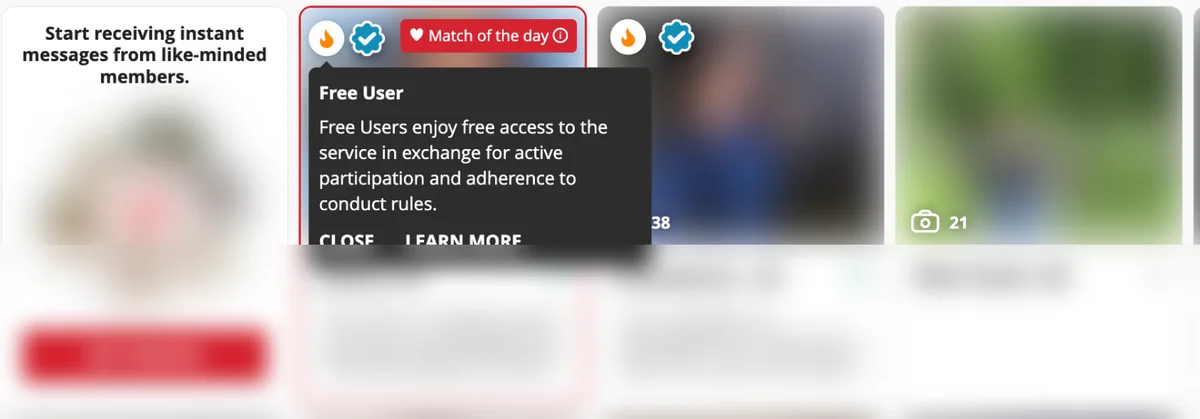
Use the Available for Video Chat filter if you want quick proof of chemistry. Online with Cam profiles can show buttons for Chat Now or Video Chat.
Basic chat costs 1 credit per minute. Audio calls cost 2 credits per minute, and offline or mobile app messages cost 1 credit per 160 symbols.
Email costs 10 credits, while sending or viewing a photo or video costs 15 credits. A voice message costs 10 credits, and a profile video view costs 10 credits.
Let’s Mingle costs 5 credits per use and sends broadcast messages. Run it when you want attention fast, but expect replies from people who received a broad invite.
Virtual gifts cost from 1 to 12,000 credits, with stickers, reactions, animated smileys, sticker packs, and chat themes also priced in credits. Real presents can be delivered to a match’s door, and the catalog shown included flowers, lipstick, cake, chocolates, and gift cards.
VR video costs 6 credits per minute, which is half the listed ceiling for one-way and two-way video. For most people, short video first and gifts later will keep spending saner.
A free account can browse profiles, be searchable, edit your profile, read messages on the web version, and buy extensions without a Monthly Credit Pack.
Is Dating.com free for chatting? Not quite, because starting a chat, an email or a video call uses credits. Dating.com free chat appears only as a possible subscription extra, and it never covers Free Users.
Dating.com subscription cost depends on the Monthly Credit Pack you choose. US checkout shows three packs in dollars, and the price you see is the total you pay.
Free Plan: A free account lets you join, browse profiles, be searchable, edit your profile and read messages on the web. Chat, email, photos, video and gifts use credits. Chats with flame-marked Free Users always use credits, even with a monthly pack.
| Credit Pack | Price | Billing | Price per Credit |
|---|---|---|---|
| 150 Credits (Welcome Offer) | $19.99 month one, then $50 | Monthly, auto-renews | $0.33 ($0.13 month one) |
| 600 Credits Most Popular | $150 | Monthly, auto-renews | $0.25 |
| 1,500 Credits | $300 | Monthly, auto-renews | $0.20 |
Credits pay for actions, so your cost depends on how you talk. Basic chat costs 1 credit a minute, email costs 10 credits, and one-way or two-way video costs up to 12 credits a minute.
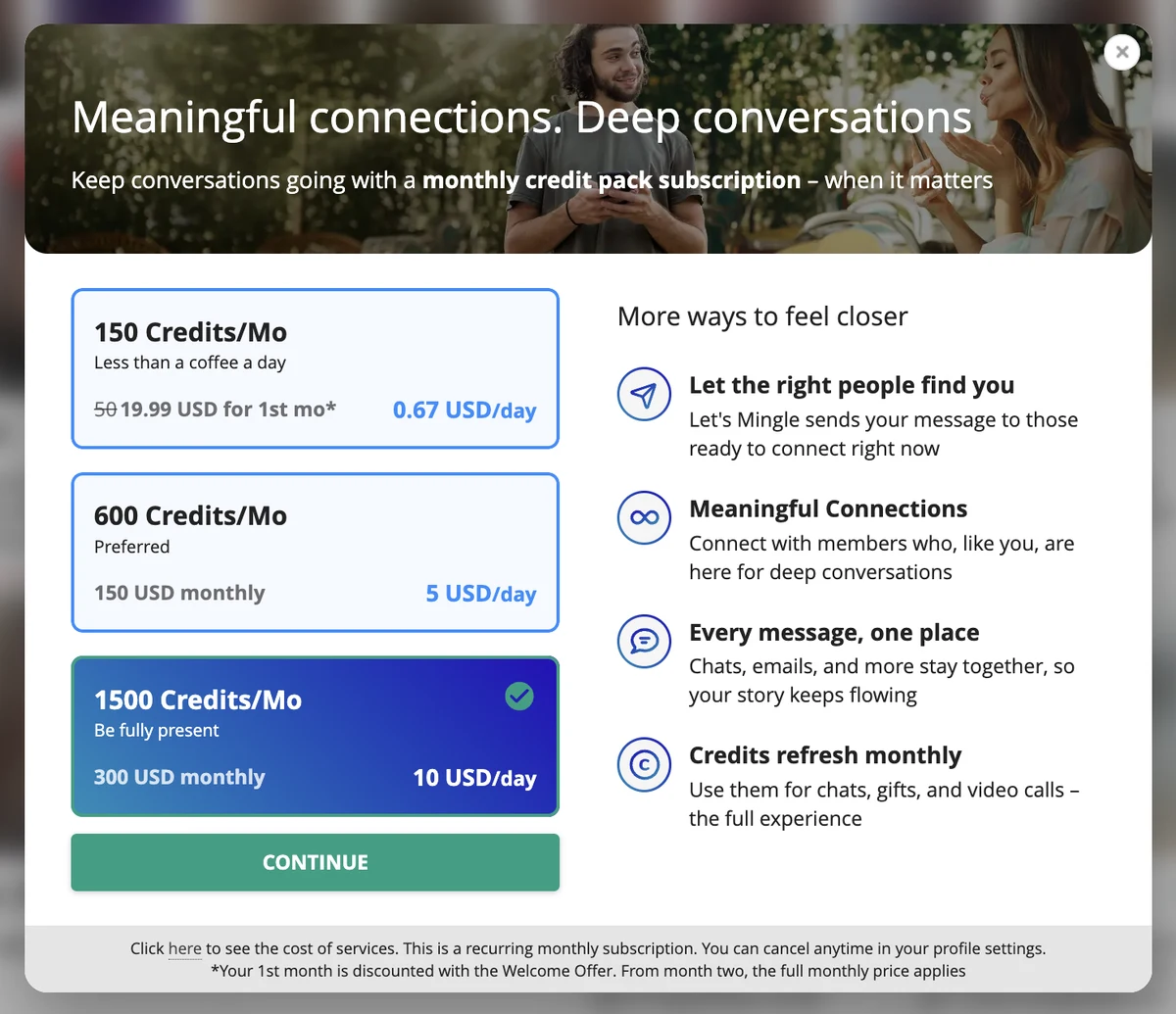
A 150-credit pack costs $50 a month, or about $0.33 per credit. During the Welcome Offer month, it costs $19.99, or about $0.13 per credit.
A 600-credit pack costs $150 a month, or $0.25 per credit. A 1,500-credit pack costs $300 a month, or $0.20 per credit.
Choosing the largest pack makes each credit 40% cheaper than the 150-credit pack. Video daters may feel that lower rate quickly.
During the first 150-credit Welcome Offer month, you get 150 minutes of basic chat, 15 emails, 10 photo views, or about 12 minutes of video at the 12-credit ceiling. One hour of text chat costs 60 credits, $15 on the 600 pack or $12 on the 1,500 pack.
A 15-minute video call can cost up to 180 credits, which is up to $45 on the 600 pack or $36 on the 1,500 pack.
The 150-credit plan showed a 60% Welcome Offer for month one. From month two, the full monthly price applies.
Monthly Credit Packs renew every month until you cancel in profile settings. Under the Terms, cancellation does not bring a prorated refund.
Purchased credits expire 90 days after purchase. Subscription credits expire at the end of the month, so plan your chats instead of stockpiling them.
Payment options shown at checkout included Apple Pay, Google Pay, Paysafe, and cards. Card icons included Visa, Mastercard, JCB, Amex and UnionPay, among others.
The refund policy allows credit refunds in specific cases, and some are partial or discretionary. Listed cases include reported scam correspondents, deleted correspondents, failed video streams, duplicate letters, poor translation, and wrong delivery.
For a terminated correspondent, support reviews the correspondence, with no more than 10 credits usually tied to the last letter. Credit refunds for member violations apply only when the violation was by a verified account.
Money refunds are listed for card fraud, a one-time erroneous purchase, and termination by the site. A one-time erroneous purchase can be full if unspent, or partial if part spent.
Used credits are non-refundable. Starting a chargeback may require disclosure of private communications under the Terms.
If you are asking is Dating.com a good dating site, it fits you best if you enjoy international chat, video dates, and paying as conversations develop. It works less well if you want unlimited messaging for one flat fee.
Start with a profile that makes conversation easy. Mention your country, what kind of connection you want, and what you enjoy talking about on video.

Keep your first chats focused, because every minute can cost credits. A good opener names something from the profile and asks one easy question.
Replies often come fast here, but stay selective. Reply to people whose goals, language, schedule, and video comfort match yours.
Choose email when you want a fuller message, since it costs a set 10 credits. Choose chat when you want a quick sense of tone before spending more.
Use video before you consider travel or deeper plans. A short video date can tell you far more than a long text thread.
Ask direct, kind questions about what the other person wants. Terms say members may seek new friends, virtual companionship, online romance, popularity, or recognition of talent.
Before a longer video call, agree on a time limit. That protects your budget and makes the call feel easier for both of you.
When a conversation starts feeling wrong, use block and report instead of arguing. Report screen text says the user will be blocked and you will no longer get messages from that blocked user.
Start small, watch your credit balance, and move to video with people who feel consistent. That is the smartest way to use an international chat site without overspending.
Keep cancellation and deletion separate in your mind, because they do different jobs. For how to delete a Dating.com account, use settings, while a recurring Monthly Credit Pack has its own cancellation path.
Look for the line that says, “Need a break? Go here to hide your account or cancel subscription.” Follow that “Go here” link before you make any account-level choice.
Choose Cancel subscription, then confirm the cancellation. Cancellation stops future renewal, and it does not create a prorated refund.
Plan ahead if you use credits slowly. Credit expiry can matter when you buy more than you need for the month.
Account screen options also included Log out, Hide from search, Turn off email notifications, and Delete profile. Those choices manage visibility and access, but they do not replace subscription cancellation when you have a recurring pack.
Deleting your profile removes bonus Credits given to help you find happiness. Spend any remaining bonus balance first if you care about losing it.
Hiding from search is softer than deleting. It notes that you will still receive invites and mingles, because those go to all members and do not rely on your profile.
Email notifications have their own setting, so turn those off if messages distract you. Turning them off can be enough when you want a pause but may return later.
Before deleting, take a minute to check open conversations, credit balance, and recent purchases. Support handles some credit-return cases under the refund policy.
The account menu has a Dating.com promo code entry with a field and an Apply button. No public code appeared in the logged-in screenshots, so do not assume there is a working code unless you have one.
Main discount pricing appeared on the 150-credit monthly pack. It costs $19.99 for the first month, then $50 a month from month two.
US checkout shows the total on one line, “You pay: 19.99 USD in total.” Read that line and the month-two price before you pay.
Think of the first month as a trial-sized budget. It can cover basic chat, a few emails, or a short video call if you spend carefully.
Treat the discount as a way to learn your pace. Text first, save video for someone who replies consistently, and avoid opening every photo or gift option on impulse.

In the US App Store, the listing name is “Dating.com: Global Chat & Date.” It is a free download, rated 17+, and listed under Social Networking.
iOS app requirements start at iOS 16.4 or later. It first released in 2015, was updated within the last month, and had about 12,700 ratings averaging 3.5 out of 5.
Buy your credits on the website if you can. The US App Store lists 150 credits for $99.99 as an in-app purchase, while the same 150 credits cost $50 a month on the web.
Website pages showed no App Store or Google Play links during the logged-in and logged-out review materials. Go to the store listing directly if you prefer the phone experience.
Messages and credits follow the same basic paid-action idea on mobile. Price list details include mobile app messages at 1 credit per 160 symbols.
One important limit applies to free members. Reading messages without paying is web-only under the Terms, so the desktop site may matter even if you like the app.
For a website Monthly Credit Pack, cancel from profile settings. App-store subscriptions need cancellation through your Apple or Google subscription settings so the store stops renewal.
On your phone, it works best for quick replies, short chats, and checking who is online. The web version may suit longer email-style messages better.
Good phone habits still matter with international dating. For broader safety context, read our romance scam statistics.
Your first week may feel busy, especially if you are used to slower dating apps. Treat the activity as a sorting period, not a promise that every greeting deserves a long chat.
Expect greetings and video invitations early, many of them from Let’s Mingle broadcasts that reach every member.
Start by checking profile basics before replying. Look for the flame symbol, the verified badge, current online status, photos, and whether the profile shows camera availability.
Keep your first replies short and warm. Ask one concrete question about daily life, language, city, hobbies, or what kind of online connection they want.
Skip jumping straight into video with every friendly opener. Basic chat helps you decide whether the pace, English level, and intentions feel comfortable.
By the middle of the week, patterns start to show. Some people reply quickly, some send polished openers, and some conversation threads fade after a few exchanges.
Let your credit balance act as a dating filter. Continue with people who answer your actual questions and match the type of connection you want.
Try the Welcome Offer month on text chat before video. A short video call can be useful, but it spends credits much faster than basic chat.
Save gifts, stickers, and photo views for later. Early spending works best when it proves real conversational fit.
Near the end of week one, choose a monthly credit budget before buying more. Decide what you can spend comfortably on chat, video, photos, and emails.
Review which conversations felt mutual. Strong matches usually answer directly, keep a steady rhythm, and make video feel natural instead of pressured.
Check your settings before renewal dates. Calendar reminders help you make that choice on purpose.
Keep one or two promising chats active instead of spreading credits thinly. International dating works better when you give a good conversation enough attention to grow.
Credits make the site work more like a conversation budget than a flat monthly pass. You spend when you choose to chat, email, view media, send gifts, or use video.
That matters if you are selective. You can browse, shortlist people, and save credits for the conversations that feel warm, mutual, and worth more time.
Readers often ask, why is Dating.com so expensive? The practical answer is that richer actions use more credits, especially video and other live features, while basic chat stays the lowest-cost way to test chemistry.
Use text first if you want control. One hour of basic chat costs 60 credits, so you can decide in advance how much of your pack you want to spend on one person.
Video works best as a next step, not an opener. A short live call can confirm energy and attraction before you keep spending on longer chats.
Larger packs lower the price per credit, with the largest pack making each credit 40% cheaper than the smallest regular pack. If you plan to chat often, that can make your month easier to plan.
For anyone asking is Dating.com legit, the plain answer is yes. It is a real service with published terms, prices, refund rules, ID verification, openly labeled Free Users, a Help Center and a phone line.
Use it with care, as you should with any international chat or video dating site. Your best experience comes when you watch badges, control spending and move slowly before sharing personal details.
Verified members complete a government ID and biometric check through SumSub. The blue badge shows completed verification.
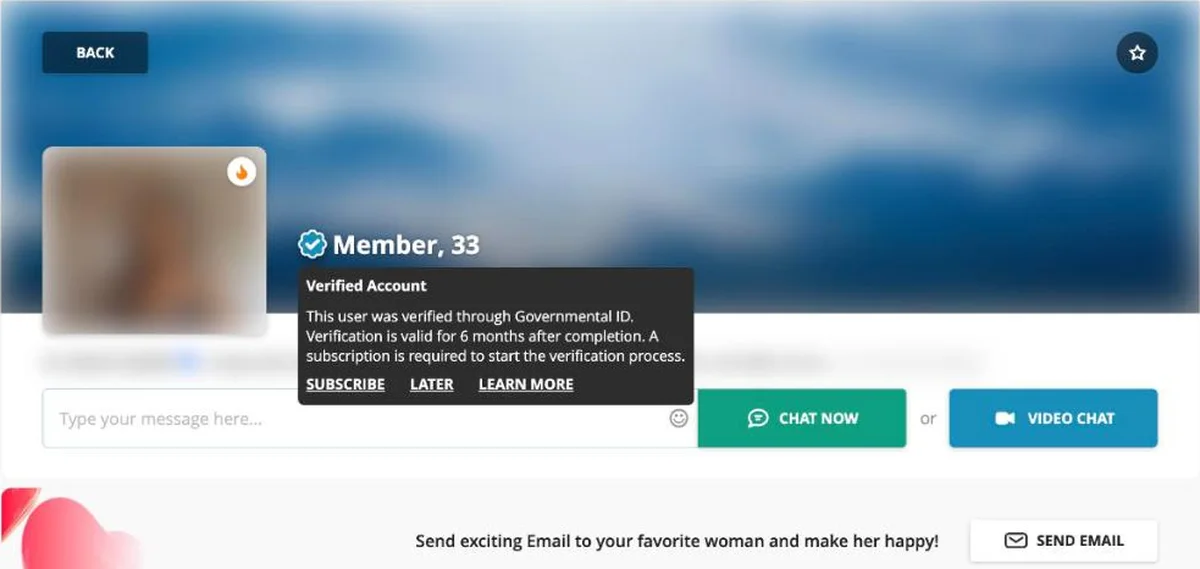
A subscription is required to start the verification process for paying members. Free Users also undergo regular identity verification and must follow conduct rules.
The site marks Free Users with a flame symbol, so you can see the member type before you spend credits. Its terms also say Free Users cannot receive monetary compensation for their involvement with the platform.
Members can report and block a profile for abuse or violence, copyright, prohibited products, adult or nudity, spam or fraud, other terms issues or a fake profile. After you submit and block, the profile cannot send you more messages.
Never send money to someone you meet online, even if the conversation feels warm. Keep money matters out of your chats and use the report tool if a request feels wrong.
Use video before any meeting, especially with someone in another country. Profile pages can show Chat Now and Video Chat buttons, and some profiles show Online with Cam.
Meet in public if you later decide to meet offline. Tell a friend where you are going, keep your own transport and keep the first meeting short.
Spend credits in small steps until you know the person’s pace and intentions. A 15-minute video call can use up to 180 credits, so a short first call helps you manage both safety and budget.
Registered members reach the support team through Live Support, and anyone can use the Contact Us form. The account menu also links to a Help Center and a Dating Securely page.
Customer support lists the phone number +356 8006-2196. Terms say availability may depend on business hours in your area.
Refund and cancellation requests go through the Contact Us form. Support reviews each case and replies with a first answer before any credits or money come back.
For a quick fix, describe the problem with the date, the member and what you spent. A failed video stream and a duplicate letter are both listed refund cases, so mention them by name.
Keep a screenshot of any charge you question. Your bank statement shows the purchase as Dating.com, which makes it easy to match a payment to your account history.
This comparison helps if you are deciding between global chat, compatibility matching and international dating with letters and video. Your choice depends on whether you want live conversation with people worldwide, long-term matching or a site focused on one region.
| Platform | Best For | How You Pay | Standout Feature |
|---|---|---|---|
| Dating.com | Global chat and video | Monthly credit packs | Free User flame and ID verification |
| eharmony | Long-term relationships | Monthly subscription | Compatibility matching |
| EliteSingles | Educated, serious singles | Premium subscription | Daily Selections |
| AsianSingles2Day | Dating Asian women abroad | Credits | Letters and video calls |
| OneWife | Meeting women from Ukraine | Credits | Live chat, video and letters |
Choose Dating.com if live chat, video, photos, email and international conversation matter most. Choose eharmony or EliteSingles if you want matching built around long-term relationships and a flat subscription.
AsianSingles2Day and OneWife suit a narrower goal, meeting women from Asia or Ukraine through credits, letters and video. For a wider shortlist, use our best dating sites hub.
Use it if you like international dating and want quick chat, video calls and profile browsing in one place. If your question is “is Dating.com a good dating site,” it fits you best when you value conversation and are comfortable paying by credits.
Another service may suit you better if you want unlimited messaging under one flat subscription. A different option may also fit if you dislike credit planning or want a site centered on compatibility matching.
Joining, browsing, being searchable, editing your profile and reading messages on the web are free. Chat, email, photos, video and gifts use credits from a monthly pack.
The 150-credit pack costs $19.99 for the first month and $50 a month after that. The 600-credit pack is $150 a month and the 1,500-credit pack is $300, which brings a credit down to $0.20.
Basic chat costs 1 credit a minute, so a free account cannot start chats. A monthly pack may add free chats with members who are not Free Users.
It marks a Free User, a member who uses the site at no charge in return for staying active and passing regular ID checks. Free Users can only talk to paying members, and chats with them always use credits.
Yes. It publishes its terms, a full credit price list and a refund policy, checks IDs through SumSub, and runs Live Support plus a phone line.
Yes. Dating.com: Global Chat & Date is a free download on the US App Store, rated 17+, and needs iOS 16.4 or later. It has about 12,700 ratings averaging 3.5 out of 5.
The account menu has a Promotional Code field where you can enter one. The main discount is the Welcome Offer, 60% off the first month of the 150-credit pack.
Open Settings, go to Manage account and click Go here next to Need a break. Cancel any subscription first, then choose Delete profile, and note that deleting removes your bonus credits.
Ready to get started?
Visit Site
Marriage Science write about dating, marriage, prenups, and relationships. No one pays us for a good review. We sign up for the apps ourselves, use them properly, and then say what we found. Every statistic links to the original source.
If a relationship, a date, or an online contact has left you unsafe, scammed, or in crisis, these organizations help for free and confidentially.
Marriage Science provides independent relationship, legal, and dating information for general informational purposes only. It does not constitute legal, medical, or mental health advice. This site contains affiliate links and we may earn a commission from qualifying purchases at no extra cost to you. Compensation may influence which products appear on the site and where, but never our ratings or editorial opinions, which are our own. © 2026 Marriage Science. All rights reserved.