



 Victoria Milan
4.1
Victoria Milan
4.1
Victoria Milan offers an anonymous, privacy-focused dating experience designed for people looking for discreet connections outside traditional relationships.
In a world of conventional dating apps where everyone’s searching for “the one,” Victoria Milan promises something different: a space for the attached to connect anonymously. Dating platforms have evolved significantly over the past decade. We’ve witnessed the rise of swipe culture, algorithm-driven matches, and niche platforms catering to every imaginable preference. But some needs remained unaddressed.
But that’s until platforms like Victoria Milan entered the scene.
Victoria Milan is an extramarital dating platform designed for married and attached individuals looking for discreet connections outside their primary relationships. We understand the subject of affairs has had a lot of controversies. But the reality is that many people do engage in external affairs. And again, the purpose of this review is not to judge choices by ‘right’ or ‘wrong.’
In this comprehensive Victoria Milan review, we’ll explore everything from the sign-up process and app functionality to cost, privacy features, and whether the platform is legit. We’ll also explore who this platform is for (and who should probably stay away, and examine real users’ experiences with Victoria Milan app.
Full Disclosure: This article contains affiliate links. If you decide to sign up for Victoria Milan through our links, we may earn a commission at no extra cost to you. This helps support our work of creating detailed, honest reviews, but our opinions remain completely unbiased.
Get started with Victoria Milan today and see what discreet dating looks like in practice.
After extensive research, testing, and analyzing hundreds of Victoria Milan reviews from multiple sources, here’s our comprehensive rating breakdown:
Overall Rating: 4.1/5 – Victoria Milan excels in privacy features but struggles with profile authenticity.
Our Quick Verdict:
Victoria Milan delivers on its promise of anonymity and discretion. The platform’s privacy features, including the AnonymousBlur tool, Panic Button, and discreet billing, are genuinely impressive and set it apart from competitors. The interface is clean, modern, and easy to navigate, even for those new to online dating.
However, the dating site isn’t all perfect. While some members report successful connections and exciting encounters, many Victoria Milan reviews point to a frustrating prevalence of fake profiles, automated messages, and bots. And those issues are especially encountered by free users.
From an overall perspective, if you’re married or attached and looking for absolute discretion, Victoria Milan’s privacy infrastructure is worth considering. But approach with realistic expectations, invest in a premium membership if you join, and be prepared to sift through several questionable profiles to find genuine connections.
Ready to explore a different kind of connection? Sign up for Victoria Milan and explore the platform risk-free with their basic membership.
The online dating landscape has transformed dramatically over the past two decades. Recent data indicates that around 40% of couples now begin their relationships on dating platforms, marking a fundamental shift in how people meet romantic partners. But within this broader trend, a particular subset of platforms has emerged: those catering to people already in relationships.
The market for discreet and affair-focused dating sites has grown substantially. In fact, industry estimates suggest millions of people worldwide use these services. This growth reflects changing social attitudes, increased accessibility through smartphones, and a desire for connection beyond traditional relationship boundaries.
Historically, extramarital affairs happened through chance encounters, workplace relationships, or social circles. But the frustrating part was that these methods carried a significant risk of exposure.
The digital age transformed this dynamic entirely. Online platforms offered something previous generations couldn’t access: complete anonymity combined with intentional searching.
The cultural shift toward accepting platforms like Victoria Milan didn’t happen overnight. Early affair sites faced substantial stigma and skepticism. However, several factors contributed to their normalization:
What drives someone to a platform like Victoria Milan instead of mainstream dating apps? The answer is just as you already assumed: fear of discovery.
When you’re married or attached, you don’t want to risk being caught. After all, the stakes of infidelity are enormous: divorce, custody battles, social judgment, professional consequences, and emotional devastation for partners and families. This creates unique demands for dating platforms:
These privacy motivations create platforms that look and function differently from mainstream dating sites. They prioritize concealment over openness, discretion over sharing, and anonymity over authenticity. However, paradoxically, that can also make them attractive to scammers and fake profiles.
Interested in exploring what Victoria Milan has to offer? Visit the Victoria Milan official site to learn more about their privacy-first approach to discreet connections.
Victoria Milan is an online dating platform specifically designed for married and attached individuals looking for discreet extramarital connections. Unlike mainstream dating apps that target single users looking for relationships, Victoria Milan operates in a controversial niche: facilitating affairs while prioritizing user anonymity and security.
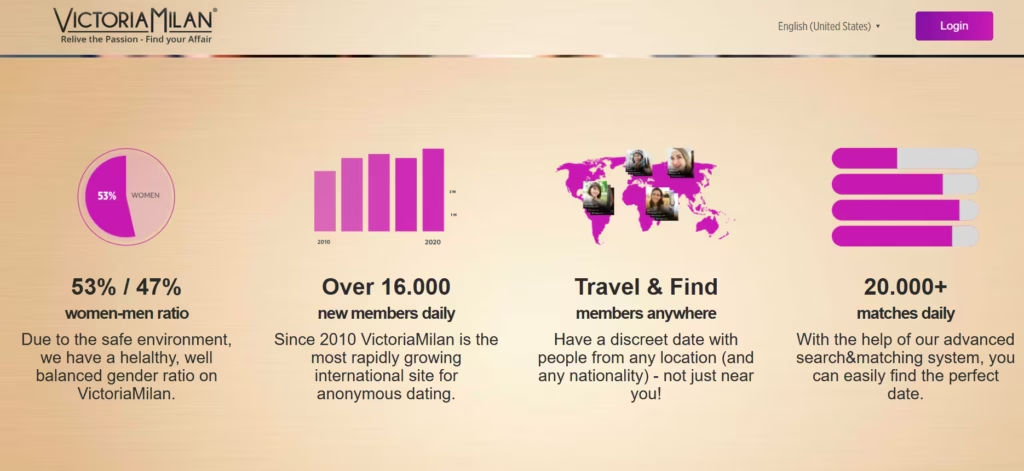
The platform positions itself as a “judgment-free zone” where people in committed relationships can explore connections outside their primary partnerships without moral condemnation. Whether you’re looking for emotional intimacy, physical encounters, or simply the excitement of something new, Victoria Milan promises a safe, discreet digital space to pursue these desires.
Victoria Milan was founded in 2010 by Sigurd Vedal, a Norwegian entrepreneur who built the platform through his company Digisec Media Group. Interestingly, rather than promoting infidelity, Vedal frames the platform as relationship preservation. He argues that some people need outlets outside their primary partnerships to remain satisfied within them.
The platform launched initially in Norway before expanding across Scandinavia: Sweden, Finland, and Denmark became early strongholds. The site now operates in 33 countries and is available in 30 languages, with particular strength in European markets like France, Belgium, the Netherlands, the UK, and Spain.
Victoria Milan reports having between 5-8 million registered users worldwide, though actual active membership numbers are more modest. The US is one of the largest markets outside Europe, with over 600,000 members. Brazil has also emerged as a significant user base, demonstrating the platform’s growing global reach.
We also noted that user demographics show approximately 60% male and 40% female membership. That’s quite impressive, as it is more balanced than many dating sites that skew heavily male.
Several factors distinguish Victoria Milan from both mainstream dating apps and competing affair platforms:
Sign up for Victoria Milan to explore local or international profiles for free and assess your match potential.
Victoria Milan is not for everyone; it definitely serves a specific purpose for specific people. Understanding whether it aligns with your situation can help avoid disappointments and wasting your investment.
Victoria Milan accommodates diverse relationship statuses, each bringing different dynamics to the platform:
Curious if Victoria Milan fits your specific situation? Create a free account and explore anonymously before committing.
We noted that Victoria Milan’s experience is not the same for free and premium members. The Victoria Milan free experience allows browsing and basic interaction but deliberately restricts meaningful communication. That’s not surprising, though, as such a model is common in dating platforms.
You’ll definitely appreciate the first impression. Victoria Milan delivers a polished, modern interface that feels more sophisticated than you might expect from an affair site. The design emphasizes elegance over sleaze, using muted colors, clean layouts, and tasteful imagery. There’s a deliberate effort to make users feel they’re accessing a premium service rather than a seedy backwater of the internet.
However, user experiences vary dramatically based on several factors such as location (major cities vs smaller markets), membership status (free vs premium), and gender (women receive more attention). Plus, your patience level will be tested: are you willing to sift through questionable profiles?
The Victoria Milan interface is amazing. The platform uses a sophisticated color palette that conveys luxury and discretion. Photography is tasteful rather than explicit. The overall aesthetic says “exclusive club” rather than “cheater’s paradise.”
User profiles balance information density with readability. You can quickly scan physical stats, relationship status, and interests without overwhelming detail. Photos display prominently with clear indicators showing whether they’re public (typically blurred) or private (requiring permission to view).
Then comes the search functionality. Filters for location, age, appearance, interests, and more are intuitive. You can save search preferences and receive notifications when new members matching your criteria join.
Victoria Milan scores high on usability. Core functions are accessible within one or two clicks. The main navigation menu clearly separates key sections: Browse, Messages, Favorites, Visitors, and Settings.
We appreciated the fact that even users with limited technical skills can create profiles, upload photos using the AnonymousBlur tool, search for matches, and manage privacy settings without frustration. This accessibility matters for Victoria Milan’s demographic: people from diverse backgrounds and age groups who prioritize functionality over cutting-edge features.
The learning curve is minimal. Within 15-20 minutes, most users understand how to navigate the platform, manage their privacy, and begin searching for connections.
Victoria Milan functions well across both desktop and web browsers, with relatively consistent experiences. The desktop version offers slightly more screen real estate for viewing profiles and managing multiple conversations, while the web mobile experience remains functional if occasionally cramped.
Load times are generally quick, images display properly, and features work consistently across Chrome, Firefox, Safari, and Edge browsers. The responsive design adapts reasonably well to different screen sizes, though the platform clearly assumes most users will engage via dedicated mobile apps rather than mobile web browsers.
One consideration: using Victoria Milan on shared computers or work devices is risky despite the Panic Button. Browser history, cookies, and autofill information can all potentially reveal activity. The platform offers guidance on using private/incognito browsing modes, but if you’re a risk-averse user, just stick to personal devices.
Try Victoria Milan and experience the platform’s interface firsthand.
Victoria Milan offers dedicated mobile apps for both iOS and Android devices, available through the App Store and Google Play. And, the Victoria Milan app is free to download on both platforms.
Overall, the Victoria Milan mobile experience is functional but not exceptional. Load times are reasonable on good internet connections, though image-heavy profiles can take several seconds to populate fully.
The mobile interface translates Victoria Milan’s desktop experience reasonably well to smaller screens. Core functions, including browsing profiles, sending messages, and uploading photos with AnonymousBlur, work smoothly. Navigation is intuitive, with a bottom menu bar providing quick access to main sections.
However, push notifications can reveal activity even when the app is closed. Ensure you disable notifications or configure them carefully to avoid compromising situations.
Ready to test the mobile experience? Sign up and download the Victoria Milan app and see how discreet mobile dating actually works.
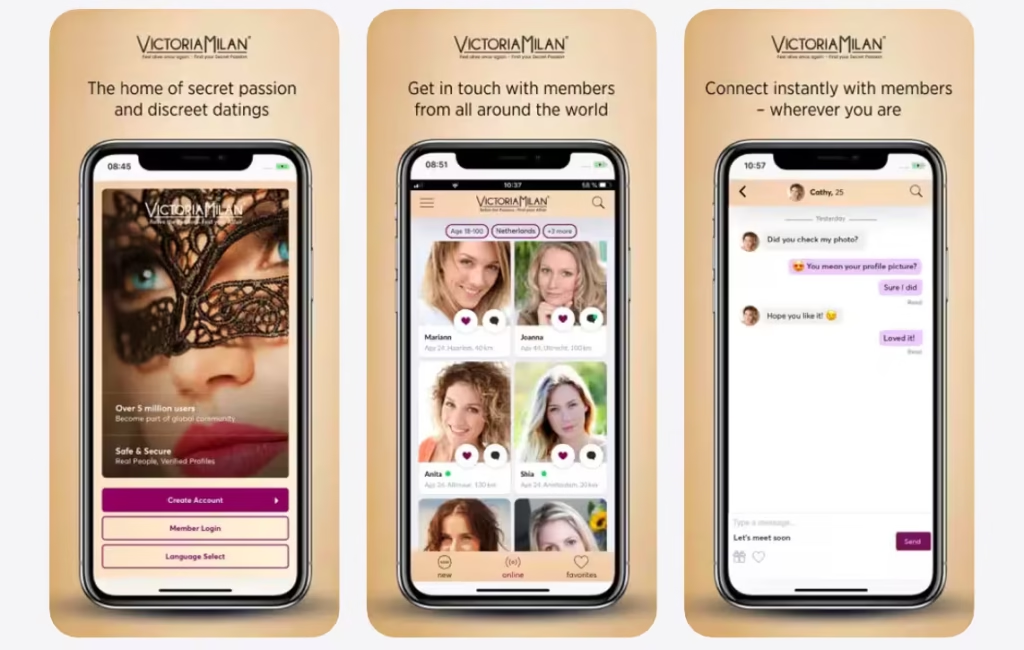
We loved that getting started with Victoria Milan is quick and simple. It shows that the platform understands that people exploring affair dating don’t want lengthy questionnaires or complicated onboarding processes.
Here’s how the sign-up works:
Head to the Victoria Milan official site or download the mobile app. The signup process is intentionally minimal, requiring far less information than mainstream dating platforms.
You’ll need to provide:
And that’s it.
No extensive personality tests, no linking to social media, no uploading government IDs. The entire process takes 30-60 seconds. You’ll receive a verification email; click the link to confirm your account, and you’re in.
After creating your account, Victoria Milan guides you through completing your profile. This is where you balance providing enough information to attract connections while maintaining anonymity.
Basically, you’ll need to provide a username, tagline, physical description, what you’re after, turn-ons and interests, and a brief bio about yourself.
With your profile complete, you can start exploring Victoria Milan’s member base. Use search filters to narrow by age, location, body type, and interests. Browse featured members. Check who viewed your profile.
Free members can browse freely but face significant communication restrictions. To actually connect meaningfully, you’ll need to upgrade to a premium membership.
Accessing your Victoria Milan account is straightforward: visit the site or open the app, enter your email and password, and you’re in. For enhanced security, we recommend these practices:
When setting up your anonymous profile, never use your real name or obvious variations. Choose a username that’s appealing but completely disconnected from your identity.
When it comes to setting location, Victoria Milan allows you to specify your location for matching purposes while maintaining privacy. You can set a general area (city or region) without providing exact addresses.
Whether Victoria Milan works for you depends significantly on how you use it. Here are strategies that increase your chances of genuine connections:
Try Victoria Milan premium and access all features designed to facilitate affairs safely.
Victoria Milan’s entire value proposition centers on privacy. You’ll love that the platform offers a significant number of industry-leading discretion tools.
AnonymousBlur: Proprietary technology that automatically blurs or masks photos before upload. Users control exactly what’s visible publicly versus what’s shared privately.
Panic Button: The platform’s most famous feature, located in the bottom right corner of the desktop site. One click instantly redirects your browser to a benign website (typically cooking recipes or innocent news).
Anonymous Profiles: Users never need to provide real names, specific locations beyond city/region, or any identifying details. Profiles use usernames only.
Discreet Billing: Credit card statements show generic corporate names rather than “Victoria Milan.” The specific merchant name varies by region and payment processor, but never explicitly references the dating site.
These tools collectively create one of the most privacy-focused dating platforms available. However, no tool eliminates all risk. User behavior (device security, communication patterns, time management) matters as much as technical features.
Victoria Milan uses both algorithm-based matching and manual search capabilities. You can sort potential matches by age range, distance, body type, relationship status, smoking/drinking habits, sexual interests, and availability for online versus in-person connections.
The platform also allows location-based discovery, where you can find members in your area or search specific cities. You can also see currently active members for real-time connection opportunities, and also track those who viewed your profile.
Victoria Milan’s communication tools are straightforward but deliberately limited for free users:
Free Communication:
Premium Communication (Full Access):
The messaging interface is simple and functional. Don’t expect anything fancy, but it works. Messages are delivered reliably, and the platform includes read receipts so you know when messages have been viewed.
Victoria Milan offers additional paid features beyond standard premium membership:
Profile Boosting: Pay to have your profile featured prominently in searches and highlighted to other members. This increases visibility and typically generates more profile views and messages.
Standard Contact Option: Premium users can pay extra ($24.99) to allow free members to contact them. This expands your potential connection pool beyond just other premium members.
Virtual Gifts: Purchase and send virtual gifts to members you’re interested in. These range from roses to champagne to more suggestive items. While somewhat cheesy, they can be effective attention-getters.
Create your account today and experience these Victoria Milan features.
Victoria Milan dating site operates on a freemium model common across dating platforms: free registration with severely limited functionality designed to encourage premium upgrades.
The platform offers a free tier that allows members to:
The free experience essentially serves as a preview: you can assess whether your local market has sufficient members and whether the interface appeals to you, but you cannot actually connect with anyone meaningfully.
Premium membership unlocks full platform functionality. Victoria Milan offers three subscription tiers differentiated by duration rather than features. What that means is that all premium levels provide identical access.
Costs vary, but here is the average premium pricing:
| Plan | Price | Cost per month |
|---|---|---|
| 3 Months | $149.97, billed upfront | $49.99 |
| 6 Months | $239.94, billed upfront | $39.99 |
| 12 Months | $359.88, billed upfront | $29.99 |
With a premium membership, you’ll enjoy:
Victoria Milan periodically offers promotional discounts and bonus codes, though availability varies by region and timing. Active Victoria Milan bonus codes and promo codes can typically be found on:
However, you should note that not all coupon codes circulating online remain valid. Many expire after promotional periods end, so always verify the discount applies at checkout before purchasing.
Victoria Milan’s cancellation and refund policies are relatively standard for dating sites. Even so, they require careful attention to avoid unwanted charges.
To cancel an auto-renewal: Log into your account – navigate to settings – my membership – select your active subscription – choose “Cancel Recurring Billing” – confirm cancellation
The platform generally does not offer refunds on purchased subscriptions. The standard policy states that all sales are final once you’ve gained access to premium features. However, exceptions occasionally apply for technical issues, fraudulent charges, and early cancellation.
The value equation for Victoria Milan depends heavily on individual circumstances. The platform is worth the cost if you live in a major city with a robust local membership, privacy and discretion features genuinely address your security concerns, and you’re committed to affair dating and willing to invest both money and effort.
However, the dating site is not worth it if you’re in a smaller market, expecting guaranteed connections, and are uncertain about pursuing affairs and just exploring possibilities.
We recommend starting with the shortest (3-month) subscription rather than the discounted annual option. This minimizes financial risk if the experience falls short of expectations.
Ready to make an informed decision? Explore Victoria Milan today and assess the member quality.

Yes, Victoria Milan is a legitimate dating platform. This means it’s a real company providing actual dating services, not a scam designed solely to steal money or data. However, “legitimate” doesn’t automatically mean “high quality.” Victoria Milan won’t steal your credit card information or disappear with your payment.
Victoria Milan is generally safe, though the context of safety means several things:
Data Security: Victoria Milan implements standard industry security measures, including 256-bit SSL encryption for data transmission, no storage of complete credit card credentials, third-party payment processing through established services, and encrypted communications within the platform.
Privacy Protection: Victoria Milan’s privacy features (AnonymousBlur, discreet billing, anonymous profiles) provide substantial protection for users who employ them correctly. However, if your partner has access to your devices, browser history, or can monitor your accounts, you might get busted.
Emotional and Psychological Safety: The least discussed but perhaps most significant safety consideration, involves emotional and mental health impacts. The truth is, many affair seekers experience psychological distress from contradictions between their values and behaviors. Also, maintaining dual realities can fragment the sense of self and create persistent anxiety.
Victoria Milan offers customer support through in-app chat support, email support ticket system, online help center with FAQ sections, and payment support for billing issues. Customer support responsiveness varies significantly based on issue type and timing. Billing and payment issues are typically addressed within 1 to 2 business days, while technical problems may take 2 to 5 days. Sign up for Victoria Milan free and judge the legitimacy of your local member base.
We analyzed Victoria Milan reviews from various review platforms and forums. Here’s what real users think of this extramarital dating site:
Most users consistently praise the privacy tools, including the AnonymousBlur, discreet billing, and the Panic Button, for providing genuine security. Users in major cities often report finding numerous genuine connections. Others appreciate interacting with people who understand and accept the affair context rather than judging it. The relatively even male-female distribution also appeals to many, especially guys who got frustrated by other platforms’ gender ratios.
Despite the praises, Victoria Milan is also a victim of negative reviews and criticism. The most consistent complaint revolves around fake profiles, automated messages, and profiles that disappear post-payment. Other users feel the subscription cost doesn’t match the quality of experience, particularly in smaller markets. We also came across users who report challenges canceling memberships and billing issues.
Overall, Victoria Milan receives around 65% satisfied users, 20% complaints, and 10% who think the platform is neither hot nor cold. The dating site works best as one tool among several for affair seekers rather than as a complete solution. Combining it with other platforms, real-world opportunities, and patience improves overall odds. Experience the Victoria Milan dating site yourself and form your own opinion.
Sign up for free and weigh these strengths and drawbacks yourself.
Yes, Victoria Milan is a legitimate dating platform operated by Digisec Media Group since 2010. It’s not a scam.
The dating platform provides strong anonymity tools, including AnonymousBlur for photos, anonymous profiles without real names, discreet billing, and encrypted communications.
Yes, but you must actively cancel auto-renewal before your subscription period ends. Navigate to Settings – My Membership – Cancel Recurring Billing.
Victoria Milan offers free registration and limited browsing, but meaningful interaction requires a premium membership.
The platform allows adult content, including nude and sexually suggestive photos, but with restrictions. Such photos must be uploaded to your private gallery rather than your public profile.
No. Victoria Milan uses discreet billing that shows generic corporate names on credit card statements rather than “Victoria Milan.”
After extensive research, testing, and analyzing hundreds of user experiences, is Victoria Milan worth your time and money? The truth is, Victoria Milan is a functional affair dating platform with excellent privacy features, but results vary based on location.
Victoria Milan is best for married or attached individuals in major cities looking for discreet affairs and those who prioritize privacy and anonymity above all else. However, you may want to consider alternatives if you’re in smaller towns with limited profiles or expect immediate success without substantial effort and investment,
Generally, the platform delivers on its privacy promises but struggles with its value proposition. It’s not a scam, but it’s not consistently effective either. Your experience will depend primarily on location and whether you’re willing to invest both money and effort with no guaranteed return.
Ready to explore affairs in a discreet, confidential space? Sign up for Victoria Milan and see if it aligns with your specific situation and needs.
Ready to get started?
Visit Site Now
Marriage Science write about dating, marriage, prenups, and relationships. No one pays us for a good review. We sign up for the apps ourselves, use them properly, and then say what we found. Every statistic links to the original source.
If a relationship, a date, or an online contact has left you unsafe, scammed, or in crisis, these organizations help for free and confidentially.
Marriage Science provides independent relationship, legal, and dating information for general informational purposes only. It does not constitute legal, medical, or mental health advice. This site contains affiliate links and we may earn a commission from qualifying purchases at no extra cost to you. Compensation may influence which products appear on the site and where, but never our ratings or editorial opinions, which are our own. © 2026 Marriage Science. All rights reserved.