




 TSSeeker
3.4
This TSSeeker review covers a casual, adult trans dating site for men looking for trans women, with free signup, VIP messaging access from $25.99 a month, and optional credits for gifts and profile boosts.
This is a good fit if you want adult, casual energy and prefer chat tools over long questionnaires. Try the free signup first, then consider VIP if you want to answer incoming messages and keep conversations going. Pick the shortest plan if you are unsure, since all paid subscriptions renew automatically.
In this TSSeeker review, I’ll explain how this adult, casual trans dating site works for flirty chats and potential casual dates online. Registration is free, so you can explore the site before deciding whether to pay for VIP features.
I signed up for a free account and explored the member area. I also checked the VIP upgrade and credit checkout screens, stopping at the card form. To understand the site’s policies, I read the terms of use and privacy policy. I did not make any payments or contact members.
This rating looks at TSSeeker as a practical option for trans-attracted men interested in casual online flirting. The setup and chat tools are straightforward, but regular use quickly pushes you toward VIP.
Ease of use is the site’s strongest point. Registration is quick, the mobile browser has a bottom menu, and the main sections are easy to find from the member home screen.
The features also score well: Live Chat, Perfect Match and Nearby give you several ways to browse. Nearby filters cover age, profile-photo limits, sexual preference, height and breast size, although the site marks these filters as VIP features.
Connection success and value for money score lowest. You need VIP, which costs $25.99 to $59.99 per month, to answer incoming messages. That means a free account cannot support a conversation on its own.
My verdict: TSSeeker is best suited to you if you want an adult, casual space with quick browsing and straightforward flirting tools. Start with a free account, build a solid profile, and upgrade only if the member area feels worth the monthly cost.
TSSeeker is a casual trans dating site at tsseeker.com that has been online since 2017. It may suit a trans-attracted man who prefers flirty chats, quick browsing and casual dates over a slower, relationship-first experience.

This is an adult site for men seeking trans women, and members must confirm that they are at least 18. The homepage presents TSSeeker as a place for casual, adult trans dating.
Profiles may include gender, age, region, city, sexual preference, height, weight, eye color, hair color, figure, tattoos, zodiac sign and “Searching for.” These details give you a quick overview before you decide whether to show interest.
Registration is free, and the site says it takes less than one minute. The form offers both email signup and a “Sign in with Google” option.
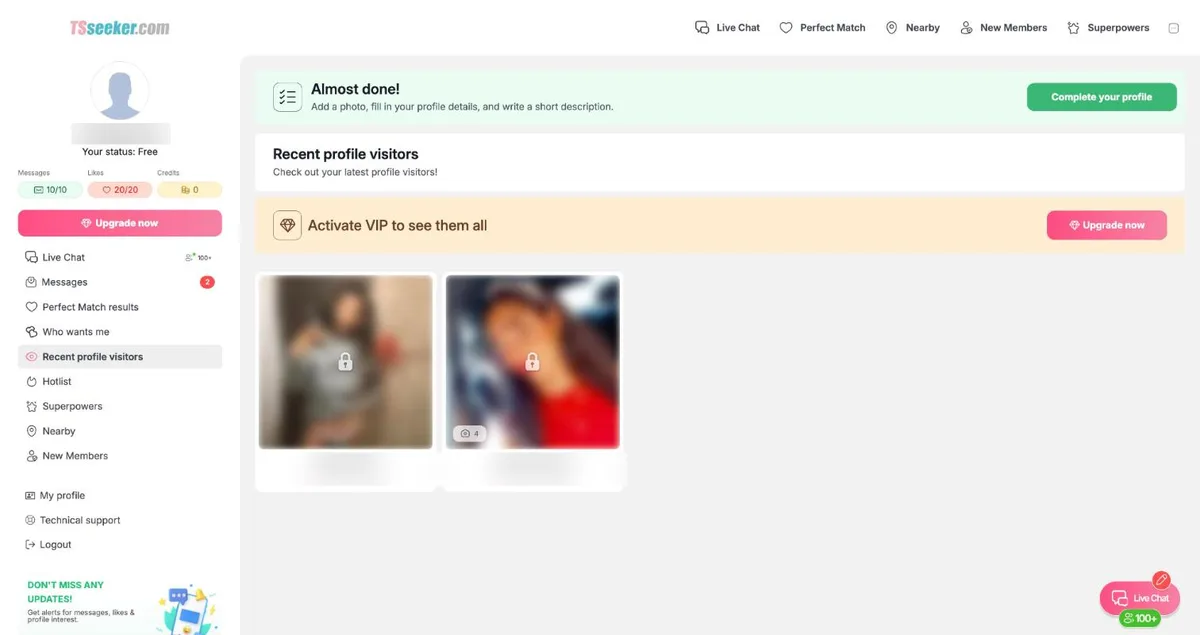
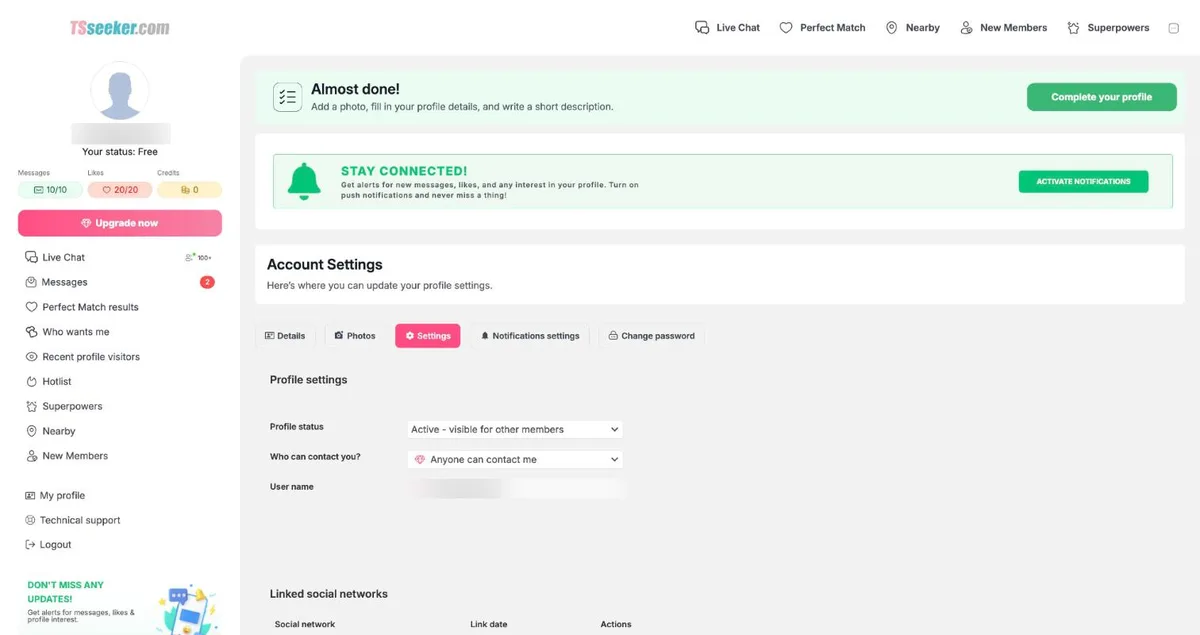
After you sign up, a green “Almost done!” bar prompts you to add a photo, complete your profile and write a short description. The editor also includes sections for details, photos, settings, notifications and password changes, plus a description field of up to 1,000 characters.
Here are the key details to review before investing time in your profile or spending money.
The member area offers several ways to browse and flirt. Explore the photo grid, Live Chat, profile pages, Perfect Match and the visitor area, then decide whether VIP is worth the cost.
Nearby displays a photo grid of members in your state, along with Sort and Filter controls. The left menu also includes New Members and a Hotlist, where you can save profiles that catch your interest.
Available filters include Age, “Limit search based on profile photo,” Sexual Preference, Height and Breast size. Each displays a diamond icon to indicate that it is a VIP feature.
Start with Nearby if you are interested in casual dates close to home. Complete your own profile, too: a sparse profile gives people little reason to reply after you upgrade.
Live Chat lists members who are online and has tabs for Active chats, Pinned chats and Online list. The screen also displays a “100+ women online” label.
Free accounts receive 10 chat requests per day, which the site calls Free Flirts. During the first 14 days after registration, the terms allow up to 140 free flirts, with a limit of 10 per day.
After the first 14 days, you cannot send more free flirts unless you upgrade. If you use all 10 requests in one day, you must wait until 06:00 for them to renew or activate VIP.
Profile pages include thumbs-up, X, message and favorite buttons, along with a Report link. You can also use suggested opening lines, send gifts or select “REQUEST DESCRIPTION” to get started from a profile.
Keep this limitation in mind before you spend: you need an active VIP account to reply to incoming messages.
VIP increases your daily chat requests to 30 and allows unlimited messages in active conversations. Under the terms, free members cannot share contact details, while VIP members may share an email address, phone number or social media details.
Perfect Match is a simple rating game. Give a profile a thumbs-up or select X. Free accounts get 20 ratings per day, while VIP members get 40.
The recent profile visitors section shows who has visited you, but free accounts display only blurred photos. You must activate VIP to see the visitors clearly.
Only VIP members can view photos containing nudity. If adult photos and full profile viewing matter to you, this is another sign that the free account is mainly a preview.
A free account works best as a way to preview the site. You can create your profile, explore the main sections and try the first-contact tools before paying.
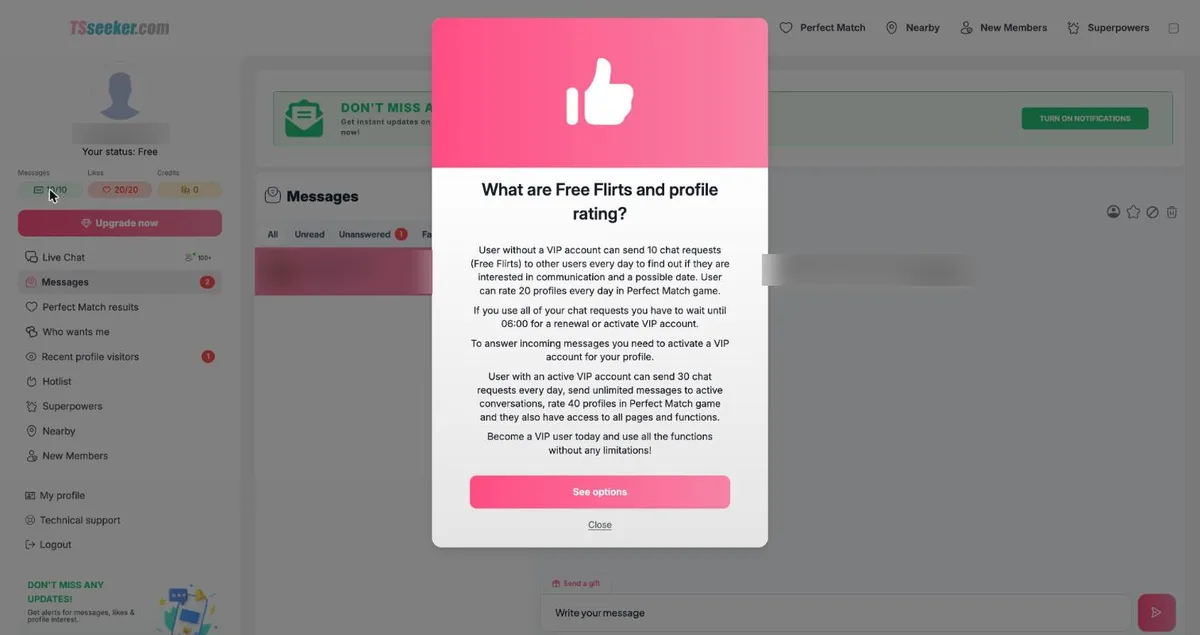
That preview comes with clear limits. Replies, full visitor details, access to adult photos, contact-detail sharing and other functions require VIP.
Use the free period to get set up. Add a clear photo, write a short description and see whether the local browsing options justify an upgrade.

So how much does TSSeeker cost? Start by comparing the VIP plans, then consider whether you need optional credits. With VIP, you can message freely in active conversations, send 30 chat requests per day, rate 40 profiles daily through Perfect Match, and access all pages.
Free Plan: A free account lets you set up a profile, browse Nearby, rate 20 Perfect Match profiles a day, and send 10 Free Flirts a day at first. The free flirt allowance runs for the first 14 days, then sending free flirts is blocked. Recent visitors appear as blurred photos unless you activate VIP.
| Plan | Monthly Price | Upfront Total | Bonus Credits |
|---|---|---|---|
| 12 Months Most Popular | $25.99 a month | 12 months, 600 bonus credits | $311.88 charged up front |
| 6 Months | $31.99 a month | 6 months, 400 bonus credits | works out to $191.94 |
| 3 Months | $40.99 a month | 3 months, 200 bonus credits | works out to $122.97 |
| 1 Month | $59.99 | 1 month, 100 bonus credits | $59.99 |
The 12-month VIP plan costs $25.99 per month and includes 600 bonus credits. You pay $311.88 upfront (12 × $25.99 = $311.88).
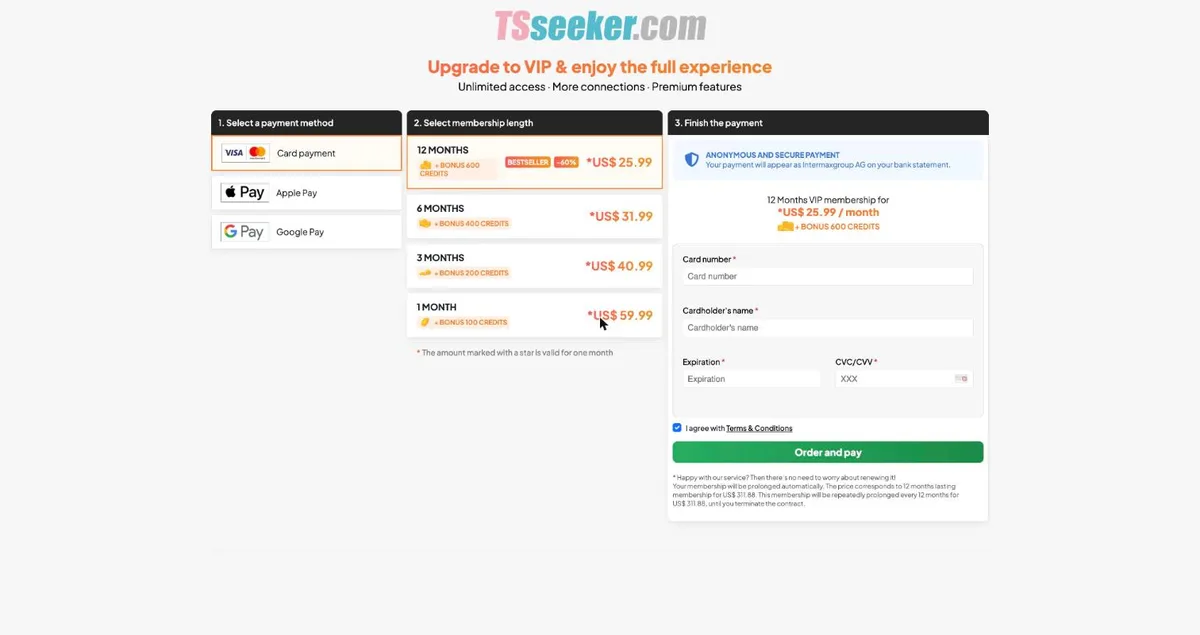
The checkout page says the 12-month membership automatically renews every year for $311.88 until you terminate the contract. The lowest monthly rate therefore comes with the longest commitment.
The six-month VIP plan costs $31.99 per month and includes 400 bonus credits. The total is $191.94 (6 × $31.99 = $191.94).
The three-month VIP plan costs $40.99 per month and includes 200 bonus credits. The total is $122.97 (3 × $40.99 = $122.97).
Monthly VIP costs $59.99 and renews at the same price each month until you terminate the contract. It requires less commitment, but the monthly rate is higher.
TSSeeker labels the annual plan “-60%,” but comparing $25.99 with $59.99 gives a monthly saving of about 56.7%, or roughly 57%.
Paying monthly for a full year would cost $719.88. Choosing the annual plan upfront saves $408 over that period.
Three monthly payments total $179.97. That is more than the full three-month plan and nearly as much as the six-month option.
If you only want to try the site briefly, the monthly plan limits your commitment. If you expect to use it regularly, the three- or six-month plans offer better value.
Credits pay for gifts, profile boosts and Superpowers. They are separate from VIP, so consider them optional spending rather than a required part of membership.
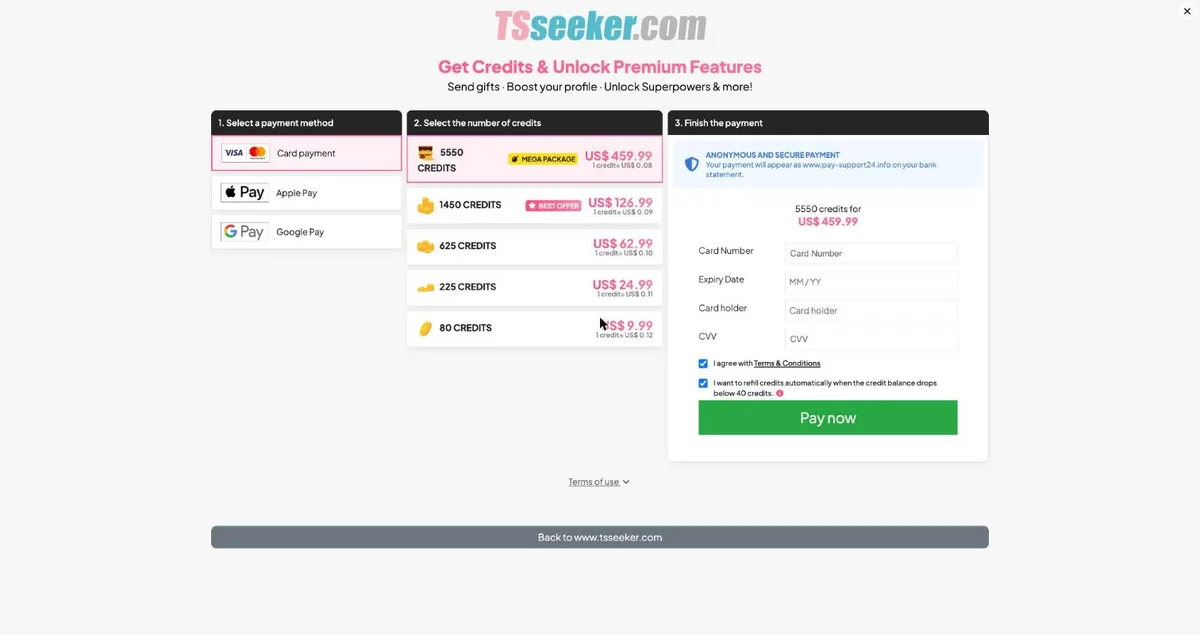
Credit packs contain 80 credits for $9.99, 225 for $24.99, 625 for $62.99, 1,450 for $126.99 and 5,550 for $459.99. The approximate cost per credit is $0.12, $0.11, $0.10, $0.09 and $0.08, respectively.
Multi-notification tells other members that you are online and costs 200 credits. Using the 225-credit pack’s rate, that works out to about $22.21.
Super Perfect Match gives your profile priority in Perfect Match for one day and costs 50 credits. At the 225-credit pack rate, that is about $5.55.
Highlight pins your TOP profile near the top of Nearby for one day and costs 100 credits. “Promote your profile” in Nearby also costs 100 credits for one day, or about $11.11 at the 225-credit pack rate.
The bonus credits included with the one-month VIP plan cover one day of Highlight. The 80-credit pack, however, is not enough to pay for a Highlight.
At checkout, the auto-refill box is selected by default, and the site can refill your balance when it drops below 40 credits. Untick the box if you do not want recurring credit charges.
You cannot redeemed credits for cash or receive a refund unless the law requires it. If you do not log in for 180 days, the site may deduct a $5 monthly account-maintenance fee from any remaining funds.
All paid subscriptions renew automatically on their expiry date for the same subscription period unless you terminate the contract.
The terms give you three business days to cancel without penalty or obligation. To cancel, contact support at support@tsseeker.com before midnight on the third business day after the contract date. Sundays and holidays do not count.
You can request refunds for unused services through the support form or by email. Include the payment date, amount and reason for the request.
Outside that process, the terms say the site does not refund unused subscription days. Chargebacks may also leave you responsible for bank fees of up to $50 for a credit card, so contact support to cancel instead.
VIP card payments appear on your bank statement as “Intermaxgroup AG.” Credit purchases appear as “www.pay-support24.info.”
To delete your account, open Settings and select “Delete account.” The site then presents a short “Why are you leaving?” survey.

Your experience depends partly on the effort you put in. Even on a casual, adult trans dating site, clear photos, considerate language and consistent follow-through can make a difference.
Use this TSSeeker review as a checklist before spending money. Complete your profile first, then decide whether VIP suits how often you expect to chat.
Start with the profile fields the site provides: gender, date of birth, region, city, sexual preference, height and weight. Then use the 1,000-character description to present yourself in a warm, specific and natural way.
Be clear about what you want without reducing trans women to a category. A line such as “Drinks, playful chat, and easy chemistry” feels more personal than a checklist of body traits.
Add at least one clear photo if you feel comfortable doing so. The site itself prompts you to upload a photo, complete your profile details and write a short description.
Keep your tone relaxed and respectful. You can flirt while still showing that you understand privacy, boundaries and safety.
Use your free chat requests to see whether the interface works for you. Just remember that you need VIP to answer incoming messages.
Open with something relevant to her profile, city or “Searching for” field. If she has not written a description, you can use the “REQUEST DESCRIPTION” button.
Profile pages offer suggested opening lines under “Not sure what to write?” Use one as a starting point, then add a personal detail so your message does not sound copied.
A quick reply does not guarantee a date. Keep your first goal simple: start a respectful conversation that feels comfortable for both of you.
If the interest feels mutual, suggest an easy plan in a public place. Coffee, a drink or a short walk can make a first meeting feel low-pressure.
Under the site’s terms, only VIP members may share contact details. Do not share your email, phone number or social media details through a free account.
TSSeeker keeps registration short, which suits casual browsing and flirty chats. Enter the basics first, then build a profile that gives people a genuine sense of who you are.
Enter your email address or choose “Sign in with Google.” TSSeeker says free registration takes less than one minute.
Look for an activation email containing the “ACTIVATE YOUR PROFILE” link. If it does not arrive within three minutes, the site advises checking your spam folder.
After signup, the green “Almost done!” bar prompts you to add a photo, complete your profile details and write a short description. Use it as your initial checklist.
Add a clear photo before spending much time rating profiles or browsing. A simple face photo can make your profile feel more approachable without looking overdone.
Write your description in your own words, staying within the site’s 1,000-character limit. Keep it warm, direct and casual, and mention the kind of chat or date you enjoy.
Enter your region and city accurately because Nearby uses these details. Correct location information matters if you want local dates as well as late-night chats.

A trans woman is a woman. Approach her with ordinary interest, good manners and genuine curiosity about her as an individual.
When her profile gives you something to work with, mention a detail in your opening message. A kind greeting is always better than a loaded or intrusive question.
Ask what she wants from the site rather than making assumptions. Some members want flirty chats, others want dates, and some are simply looking for people they feel safe talking to.
Avoid asking about surgery, anatomy or her personal history in your first message. These subjects are private, and she does not owe you those details to deserve respect.
Protect her privacy both on and off the site. Never out someone, share screenshots or discuss her trans status with others without her permission.
Keep your conversations consensual and considerate, even on an adult casual dating site. You can be flirtatious without being disrespectful, and direct without being harsh.
Use her chosen name and pronouns. If you are unsure, ask politely and accept her answer without turning it into an argument.
For more context about LGBTQ communities, Marriage Science has a separate guide to LGBTQ population statistics. Apply the same respect for real people to every message you send.
The site does not link to a dedicated iPhone or Android app, so you will use your phone’s browser instead. That works well enough for quick checks and casual browsing.
On a phone, the bottom menu keeps the main sections within easy reach: Live Chat, Perfect Match, Nearby and New Members.
Use Live Chat to see who appears to be online. Nearby is more useful for local browsing when you have entered your region and city correctly.
If you plan to use the site regularly, add it to your phone’s home screen. You will then have a one-tap shortcut without needing a separate app.
Enable push notifications only if they suit your routine. They can help you respond promptly, but you may prefer to keep them off if you share a device or want more privacy on your screen.
Use your phone for quick tasks such as checking likes, rating profiles and updating your profile text. Save longer messages for a time when you can give them proper attention.
Use your first week to learn how the site works before spending more than you planned. Take your time, note which features are useful and keep your expectations realistic.
Complete the profile prompts, then browse Nearby and New Members. A finished profile gives people more context than an empty page.
Use Perfect Match as a low-pressure way to show the site what you like. Make thoughtful use of your daily free ratings.
Send a few Free Flirts rather than using the same opening line with everyone. A thoughtful message is more useful than a high volume of generic ones.
Visit at different times and compare Live Chat, Nearby and Perfect Match. This will help you see which sections best fit your habits.
Once you have a feel for the site, refine your profile. Replace stiff wording with natural language and explain the kind of casual connection you hope to find.
Do not take blurred visitor photos as evidence that a conversation will follow. Focus instead on the people you choose to contact and the impression your own profile makes.
Before upgrading, pause and decide which features you actually need. VIP is most useful if you want to answer incoming messages, continue active conversations and access more of the site.
Keep your first week calm and purposeful. Complete your profile, test the main tools and pay only if the site fits the way you want to flirt and date.
Small choices during setup can affect both your costs and your experience on TSSeeker. Review these common mistakes before buying credits, sending flirts or leaving your account inactive.
Buying too few credits. A one-day Highlight costs 100 credits, so the 80-credit pack will not cover it. If you want to pin your profile near the top of Nearby, check the price first and buy enough credits for the feature you intend to use.
Leaving auto refill ticked. At checkout, the refill option is selected by default and can trigger when your balance falls below 40 credits. Untick it before paying if you want to decide separately each time you buy credits.
Renewing monthly by habit. Three months on the monthly plan costs more than buying the three-month plan upfront. If you already expect to use the site for longer, compare the total cost before another monthly renewal.
Missing the free flirt window. You can send up to 10 free flirts per day during the first 14 days after registration. Use that period to find profiles that suit your style, then decide whether VIP is worthwhile for ongoing chats.
Letting a free account sit unused. Accounts inactive for more than 60 days may lose conversations, visitors, ratings or the entire profile. If you are still interested, log in and update your profile before taking a long break.
Sharing contact details too soon. The terms prohibit free members from sharing email addresses, phone numbers or social media details. Keep early conversations on the site until your account level allows you to share them.
Filing a chargeback instead of cancelling. Chargebacks may result in bank fees, including $7 for direct debit and up to $50 for a credit card. Cancel through support instead, using the Technical support form or emailing support@tsseeker.com.
Is TSSeeker legit? It operates as a paid service with stated prices and billing terms, although the usual cautions about adult dating sites still apply. During this review, I found that TSSeeker has operated since 2017 and displays checkout prices, renewal terms, card payment, Apple Pay, Google Pay, a three-business-day cancellation right and Report tools.
The terms also state that the site may use staff-run and virtual profiles. Read section 4 before paying; the FAQ below also addresses this point.
For safety, approach TSSeeker as an adult flirting and chat site first. Use your judgment before sharing personal details, moving the conversation off-site or arranging a date.
Every profile has a Report link. You can report abusive behavior, an inappropriate profile description, fake photos, spam and other concerns. Use it if anything feels wrong or pressuring.
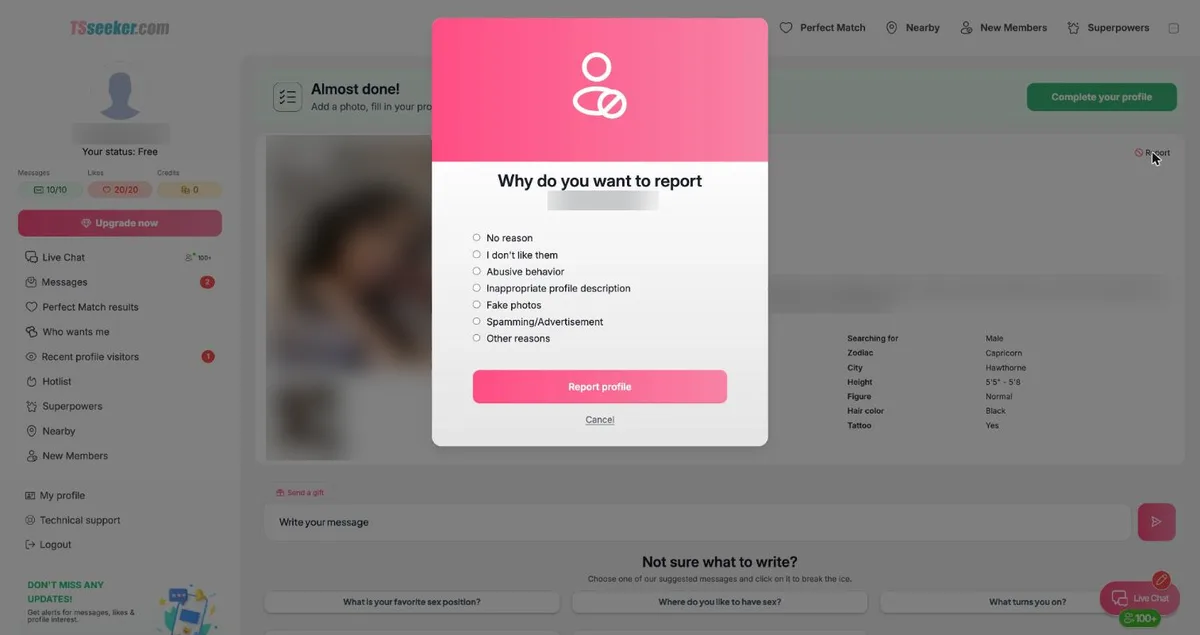
In Settings, you can manage your profile status, including whether it is active and visible to other members. Some additional controls, such as “Who can contact you?” and changing your username, are marked as VIP features.
The payment pages describe card payments as anonymous and secure. The different statement descriptions for VIP and credit purchases can also help you identify charges later.
You can turn on push notifications for messages and likes. Settings also lets you link or unlink a Google account.
The terms say TSSeeker records voice, image and text conversations to help prevent fraud, analyze chargebacks and protect consumers. While this may help protect the service, you should avoid sharing anything you would not want stored.
Do not assume the site has verified profile claims. The terms say TSSeeker does not screen members or verify their statements, so you still need to follow your own dating-safety practices.
Never send money to someone you meet on a dating site. Keep financial requests off the table, including loans, gifts, investments and stories about emergencies.
If you plan to meet, have a video call first. A brief call can help you assess chemistry, communication and basic comfort before spending time or travelling.
Choose a public place for your first date. Tell a friend where you are going, whom you plan to meet and when you expect to return.
Respect a trans woman’s privacy throughout the process. Never out anyone, and let her decide what she feels comfortable sharing about her name, photos and personal details.
The member area has a Technical support page with a contact form. The form is pre-filled with your email address and user ID, lets you attach a file and links to help documents.
For cancellations, the terms list support@tsseeker.com as the contact email. You can also submit refund requests through the support form or by email, including the payment date, amount and reason.
Choose a site that matches your pace and intentions. TSSeeker is aimed at trans-attracted men seeking casual adult chats with trans women, while the comparison sites focus on broader flirty chat, LGBTQ dating or relationships.
| Platform | Best For | How You Pay | Standout Feature |
|---|---|---|---|
| TSSeeker | men looking for casual chat and dates with trans women | VIP from $25.99 a month on 12 months, $59.99 for one month, plus optional credits | Live Chat list of members online and a Perfect Match rating game |
| Hookupers | adults who want flirty chat | premium packages, price shown before purchase | three-business-day cancellation |
| GayBloom | gay, bi and lesbian singles | trials and plans from 1 to 6 months, price shown at sign-up | subscription dating site for LGBTQ singles |
| My Transgender Date | trans women and men who want a relationship | free for trans women, men pay $29.90 a month to send messages | photo and profile moderation |
If you prefer a relationship-first experience, read our My Transgender Date review before deciding. TIts payment model differs: men pay $29.90 per month to send messages.
TSSeeker may suit you if you are a trans-attracted man looking for flirty chats and casual online dating with trans women. It focuses on quick browsing and offers Live Chat, Nearby, New Members and the Perfect Match rating game.
You may want another service if you prefer a relationship-first atmosphere, a dedicated iPhone or Android app, or the ability to reply to messages for free. TSSeeker requires VIP to answer incoming messages, and free chat requests end after the first 14 days.
Not necessarily. Section 4 of the terms says the site uses “animators who are not explicitly identified in the system” and reserves “the right to create and use virtual profiles”.
The terms add that these animators write to other users, so read that section before you pay for VIP.
TSSeeker has been online since 2017, shows its prices and renewal terms at checkout, and accepts card, Apple Pay and Google Pay. Its terms say it does not screen members or verify what they say, so use normal dating safety.
VIP is $59.99 for one month or $25.99 a month on the 12-month plan, which is charged as $311.88. Every plan renews automatically until you cancel.
Free members get 10 Free Flirts a day during the first 14 days after registration. To answer incoming messages, you need an active VIP account.
It is web only, and the site does not link to an iPhone or Android app. It works in a phone browser with a bottom menu for Live Chat, Perfect Match, Nearby, and New Members.
Credits pay for gifts, profile boosts, and Superpowers like Highlight or Super Perfect Match. The credit checkout has automatic refill ticked by default when the balance drops below 40 credits, so untick it if you do not want repeat credit charges.
Email support@tsseeker.com. The terms give a right to cancel without penalty until midnight of the third business day after you buy, and after that plans renew for the same period until you cancel.
Use the Report link on profiles for abusive behavior, fake photos, spam, or other reasons. Never send money, video call before meeting, meet in public, tell a friend where you are, and respect a trans woman’s privacy.
Ready to get started?
Visit Site
Marriage Science write about dating, marriage, prenups, and relationships. No one pays us for a good review. We sign up for the apps ourselves, use them properly, and then say what we found. Every statistic links to the original source.
If a relationship, a date, or an online contact has left you unsafe, scammed, or in crisis, these organizations help for free and confidentially.
Marriage Science provides independent relationship, legal, and dating information for general informational purposes only. It does not constitute legal, medical, or mental health advice. This site contains affiliate links and we may earn a commission from qualifying purchases at no extra cost to you. Compensation may influence which products appear on the site and where, but never our ratings or editorial opinions, which are our own. © 2026 Marriage Science. All rights reserved.